👁️⃤ Exposure Triangle Reference Guide
Purpose: Use this guide to understand how aperture, shutter speed, and ISO work together in Manual mode (M) and how each control changes both exposure and the visual appearance of a photograph.
Exposure is not only about making an image lighter or darker. Each setting also changes how the photograph represents depth, movement, detail, and image quality.
Related guides and activities
- 📸 Camera Setup and Aperture Priority Mode
- 📸 Additional DSLR Camera Settings
- 📸 Manual Mode and Shutter Speed
The three exposure controls
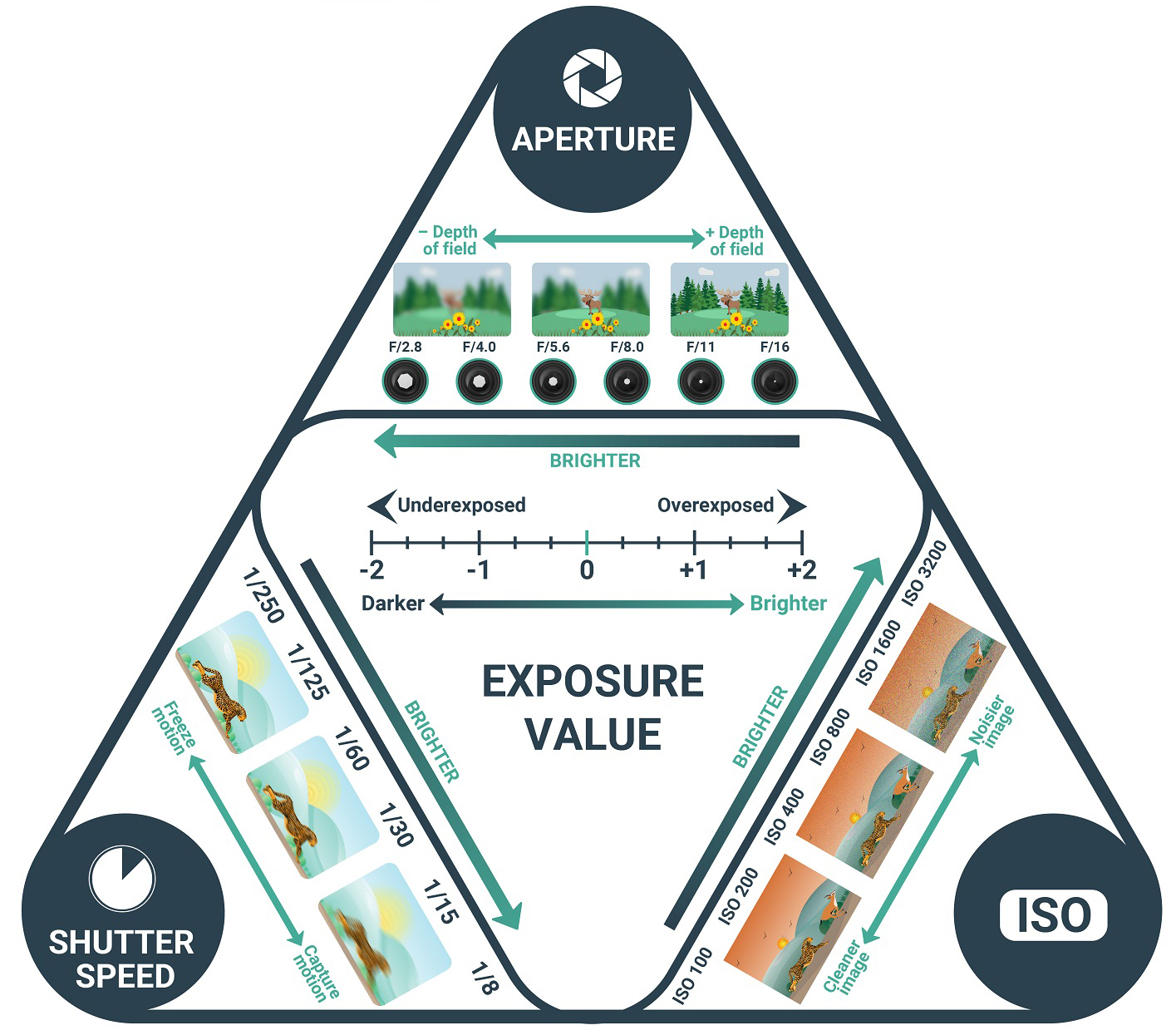
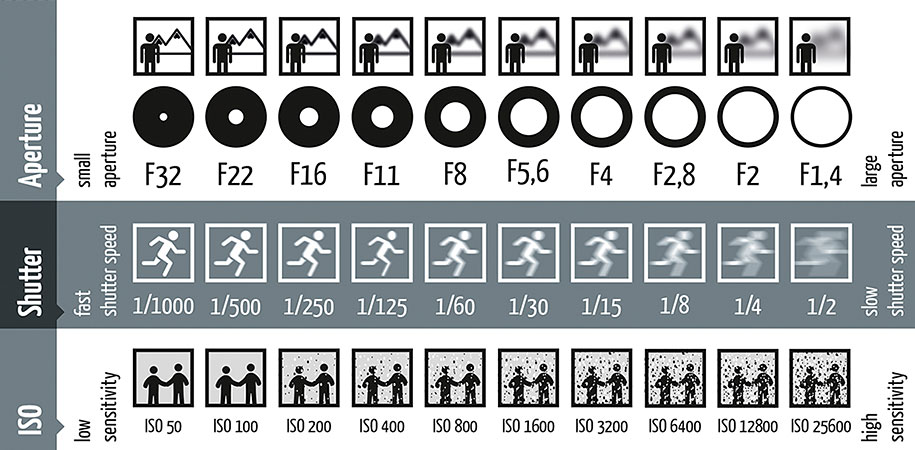
| Setting | What it controls | Exposure effect | Main visual effect |
|---|---|---|---|
| Aperture | Size of the lens opening | Wider openings allow more light; narrower openings allow less light | Depth of field |
| Shutter speed | How long the sensor records light | Slower speeds record more light; faster speeds record less light | Frozen movement or motion blur |
| ISO | Strength of image-signal amplification | Higher values brighten the recorded image | Digital noise and image quality |
Camera Modes: Av and M
In Aperture Priority (Av), you select the aperture and ISO. The camera selects the shutter speed.
In Manual mode (M), you select:
- Aperture
- Shutter speed
- ISO
In both cases, review the histogram to check brightness and confirm that important highlight and shadow detail is preserved.
Histogram
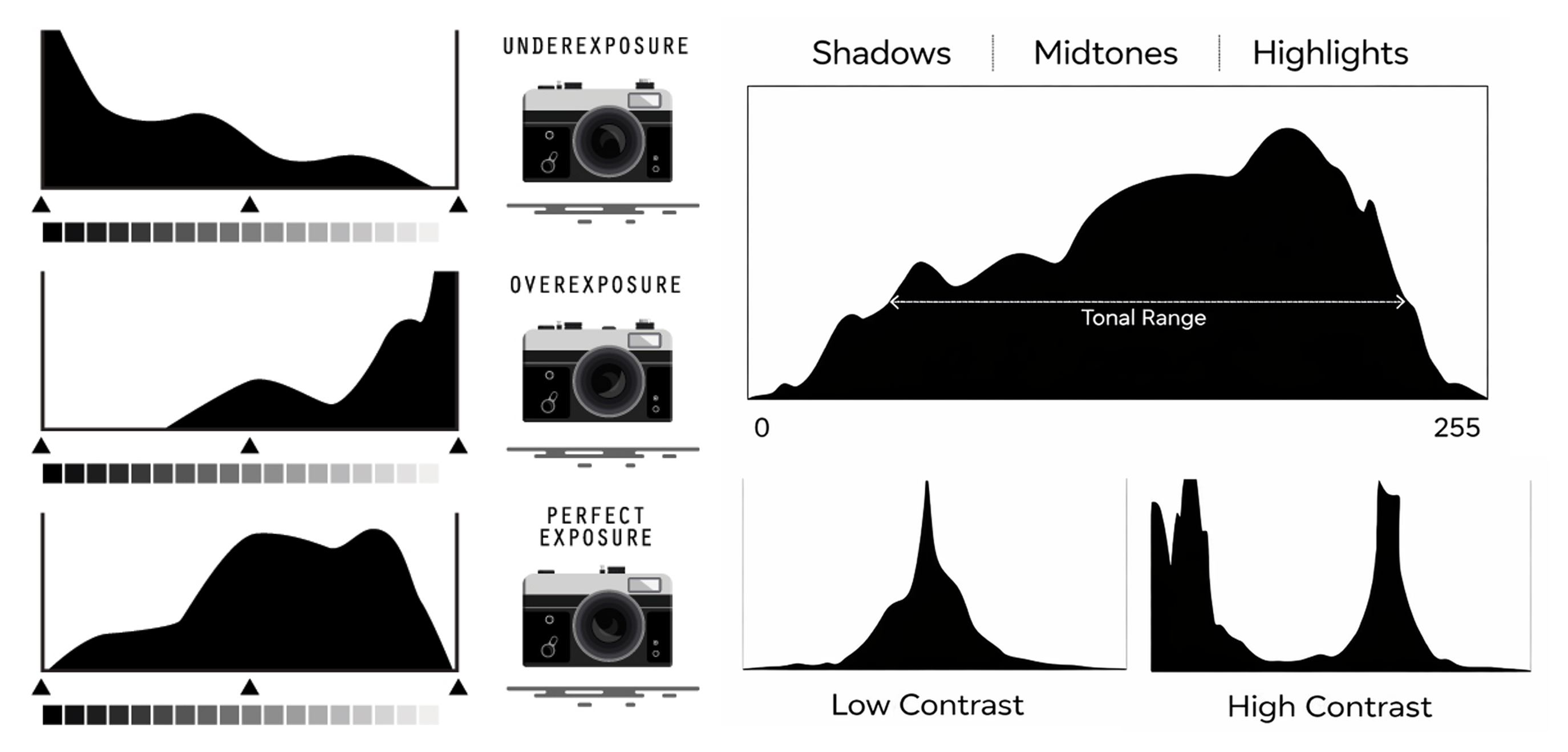
The histogram shows how brightness values are distributed:
- Left: Shadows and darker values
- Centre: Midtones
- Right: Highlights and brighter values
The histogram does not need to be centred. Its shape depends on the subject, lighting, background, and intended brightness of the photograph.
Use it to identify:
- A strong pile-up against the left edge that may indicate blocked shadows
- A strong pile-up against the right edge that may indicate clipped highlights
- Whether important tonal information is retained
- How exposure changes when aperture, shutter speed, or ISO changes
</div> </details>
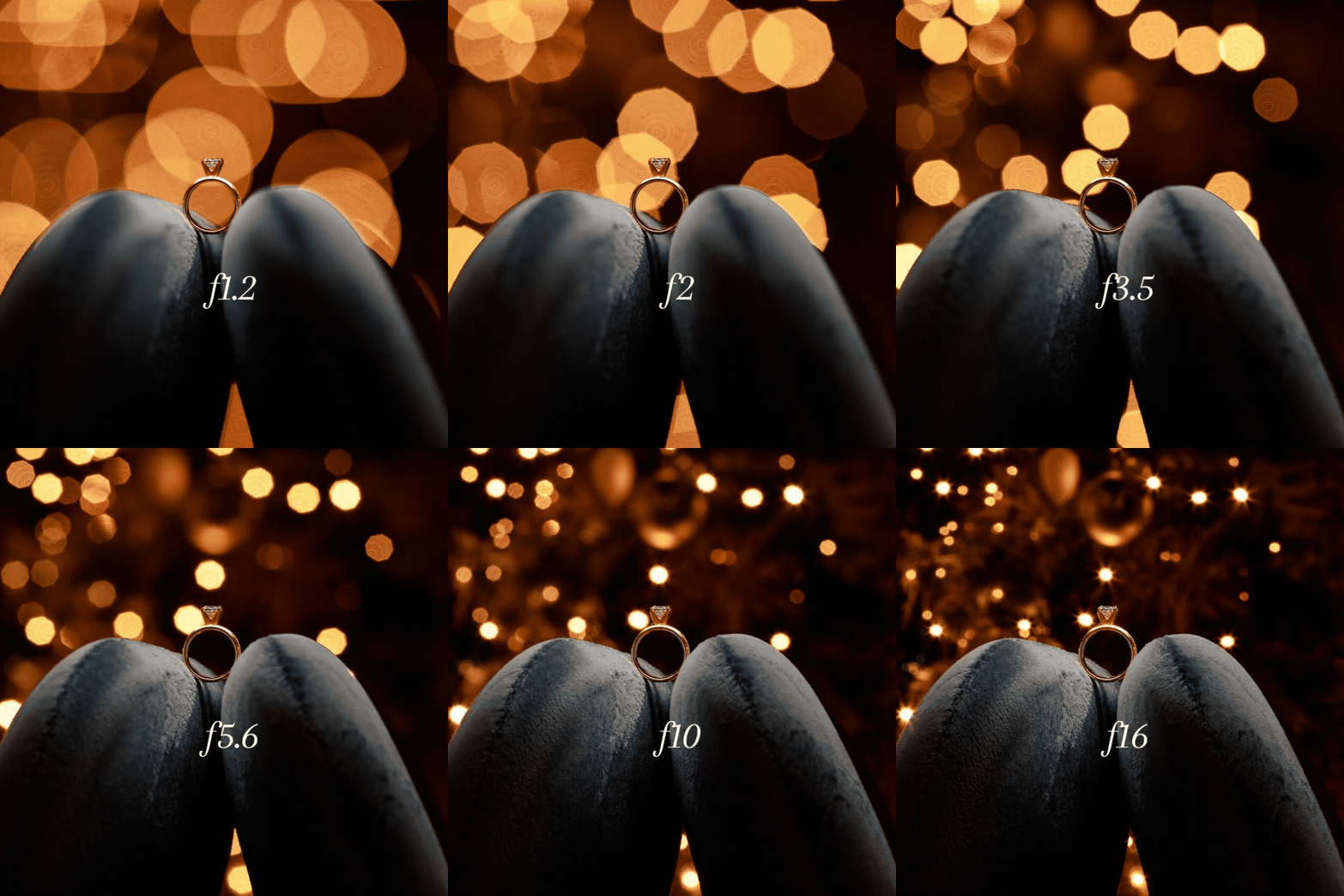
Aperture
| F-number | Lens opening | Exposure effect |
|---|---|---|
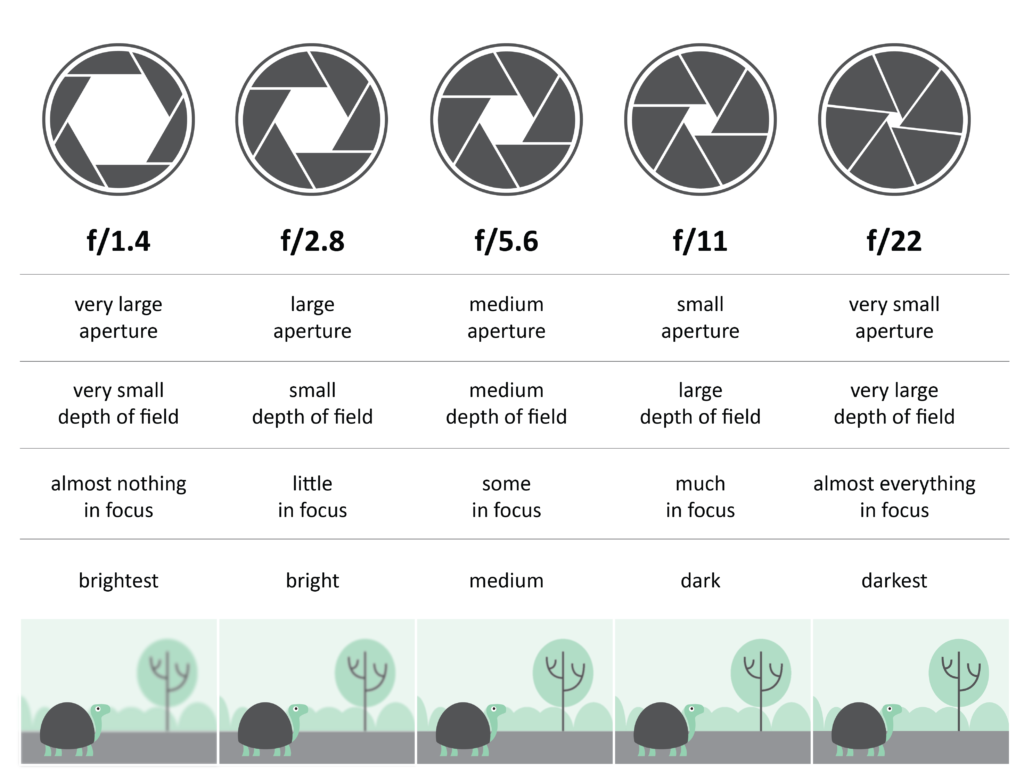
| Lower f-number | Wider opening | Allows more light to enter the camera |
| Higher f-number | Narrower opening | Allows less light to enter the camera |
Camera display notation
Aperture values are written with f/, but the camera may display the value as a number alone or with an F.
| Written value | Camera display | Lens opening |
|---|---|---|
f/3.5 |
3.5 or F3.5 |
Very wide |
f/4 |
4.0 or F4.0 |
Wide |
f/5.6 |
5.6 or F5.6 |
Moderately wide |
f/8 |
8.0 or F8.0 |
Medium |
f/11 |
11 or F11 |
Narrow |
f/16 |
16 or F16 |
Very narrow |
f/22 |
22 or F22 |
Smallest commonly used opening |
The lowest available f-number depends on the lens and selected focal length.
Aperture and depth of field
Depth of field is the area in front of and behind the focus point that appears acceptably sharp.
- A wider aperture, such as
f/2.8orf/4, generally produces a shallower depth of field. - A narrower aperture, such as
f/11orf/16, generally produces a deeper depth of field.
Depth of field also depends on:
- Focal length
- Camera distance from the focus point
- Distance between the subject and background
- Sensor size
Aperture does not work alone. A wide-angle photograph can still have shallow depth of field when the camera is close to the focus point and the background is far away.
Quick aperture decisions
| Visual goal | Aperture direction |
|---|---|
| Separate a subject from the background | Use a lower available f-number |
| Keep foreground and background more defined | Use a higher f-number |
| Record in lower light without changing shutter speed or ISO | Open the aperture |
| Reduce the amount of light entering through the lens | Close the aperture |
</div> </details>
Shutter Speed
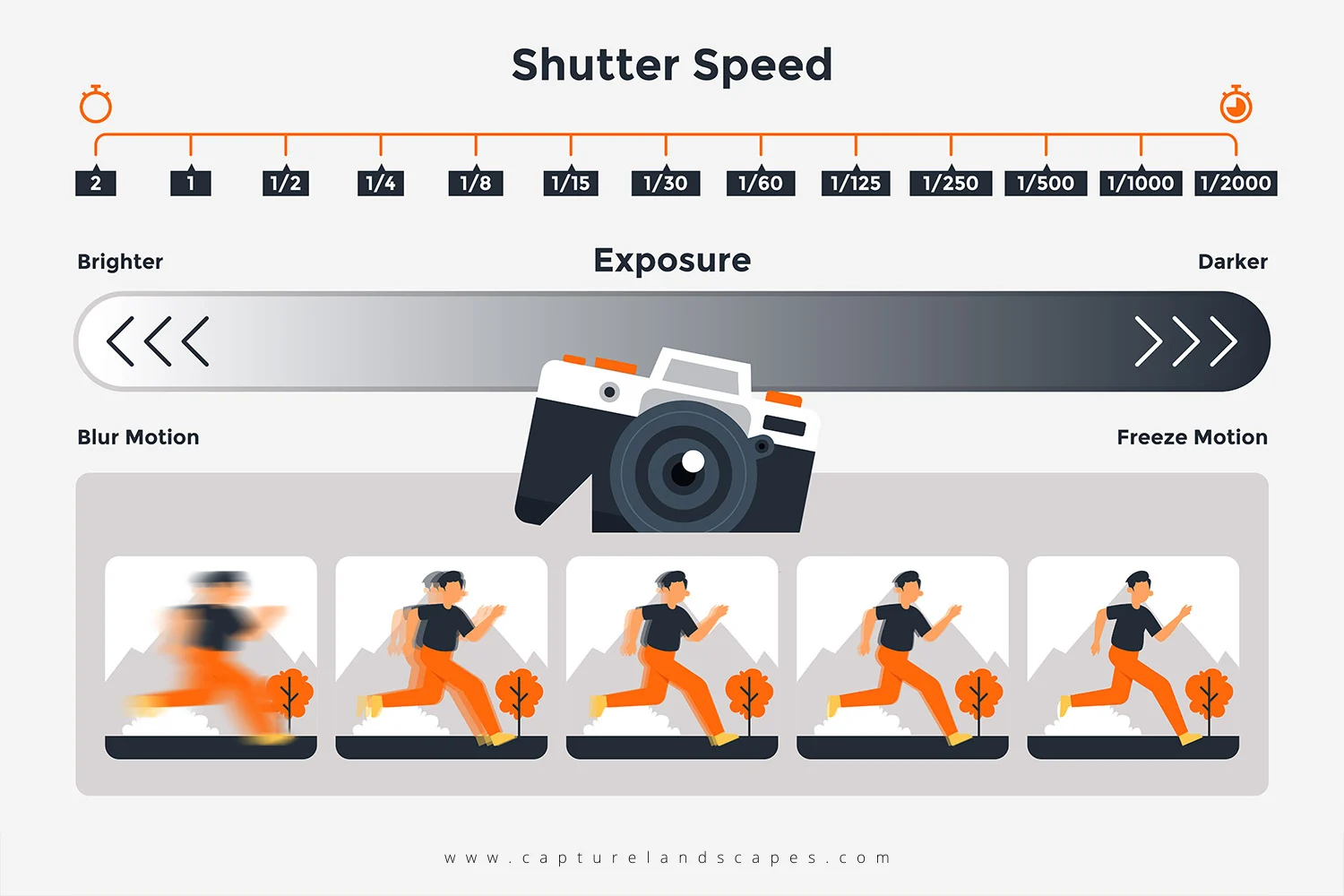
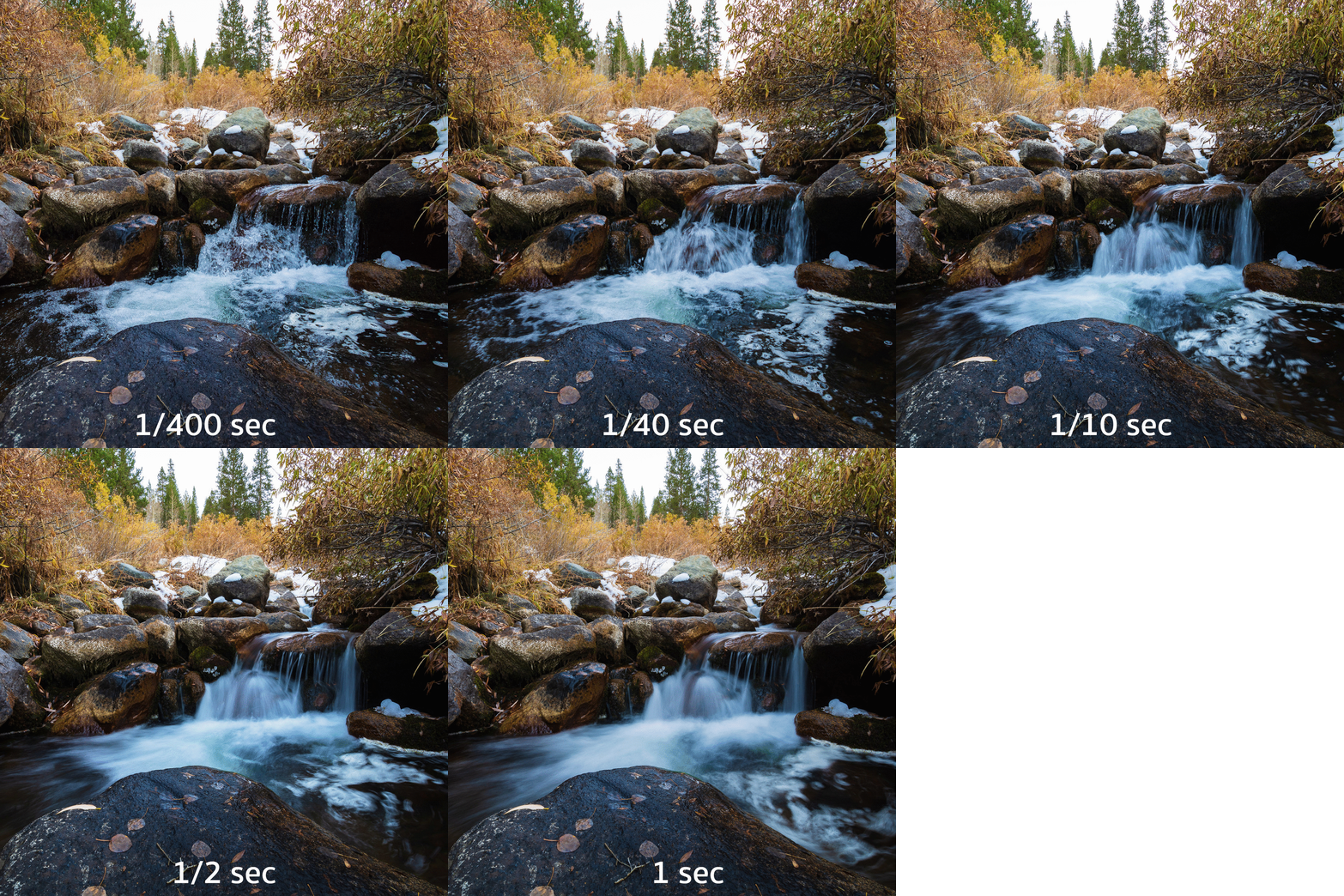
| Shutter speed | Recording time | Exposure effect | Movement effect |
|---|---|---|---|
Fast shutter speed1/1000 to 1/250 |
Short interval | Allows less light to reach the sensor | Freezes movement |
Moderate shutter speed1/125 to 1/60 |
Medium interval | Allows a moderate amount of light to reach the sensor | May freeze or slightly blur movement |
Slow shutter speed1/30 to 1/8 |
Long interval | Allows more light to reach the sensor | Produces motion blur |
Camera display notation
Fractional shutter speeds usually appear on the camera without 1/.
| Written value | Camera display | Exposure time |
|---|---|---|
1/1000 |
1000 |
One-thousandth of a second |
1/500 |
500 |
One-five-hundredth of a second |
1/250 |
250 |
One-two-hundred-and-fiftieth of a second |
1/125 |
125 |
One-one-hundred-and-twenty-fifth of a second |
1/60 |
60 |
One-sixtieth of a second |
1/30 |
30 |
One-thirtieth of a second |
1/15 |
15 |
One-fifteenth of a second |
1/8 |
8 |
One-eighth of a second |
Subject movement and camera movement
Motion blur may come from:
- Subject movement: The subject moves while the camera remains stationary.
- Camera movement: The camera moves while the shutter is open.
- Both: The subject and camera move during the exposure.
When testing subject movement:
Keep the camera stationary on a tripod. Do not move the tripod, reframe, change focal length, or refocus during the sequence. Only the subject should move.
Quick shutter-speed decisions
| Visual goal | Shutter-speed direction |
|---|---|
| Freeze rapid movement | Use a faster shutter speed |
| Show motion blur | Use a slower shutter speed |
| Reduce camera shake when working handheld | Use a faster shutter speed |
| Record more light without changing aperture or ISO | Use a slower shutter speed |
Record movement naturally at 30 fps video |
Begin at 1/60 |
For video recorded at
30 fps,1/60is a standard starting point. Change it only when a different rendering of movement is intentional.
ISO
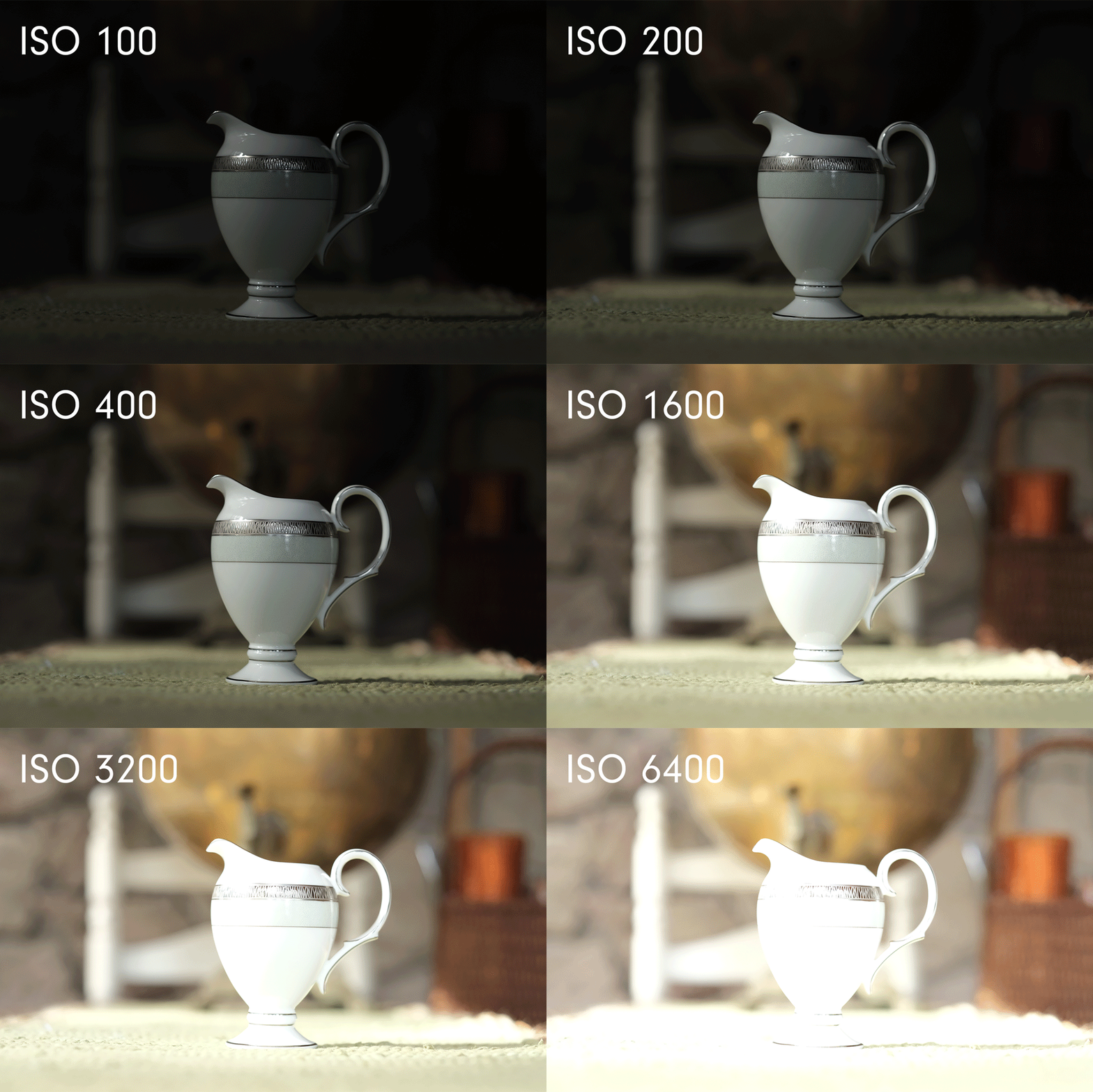
| ISO range | Signal amplification | Image quality |
|---|---|---|
Low ISO100–400 |
Low | Cleaner image with less visible noise |
Medium ISO800 |
Moderate | Some noise may become visible |
High ISO1600–3200 |
Strong | More visible noise, especially in shadows |
ISO brightens the recorded image through signal amplification; it does not increase the amount of light entering the camera.
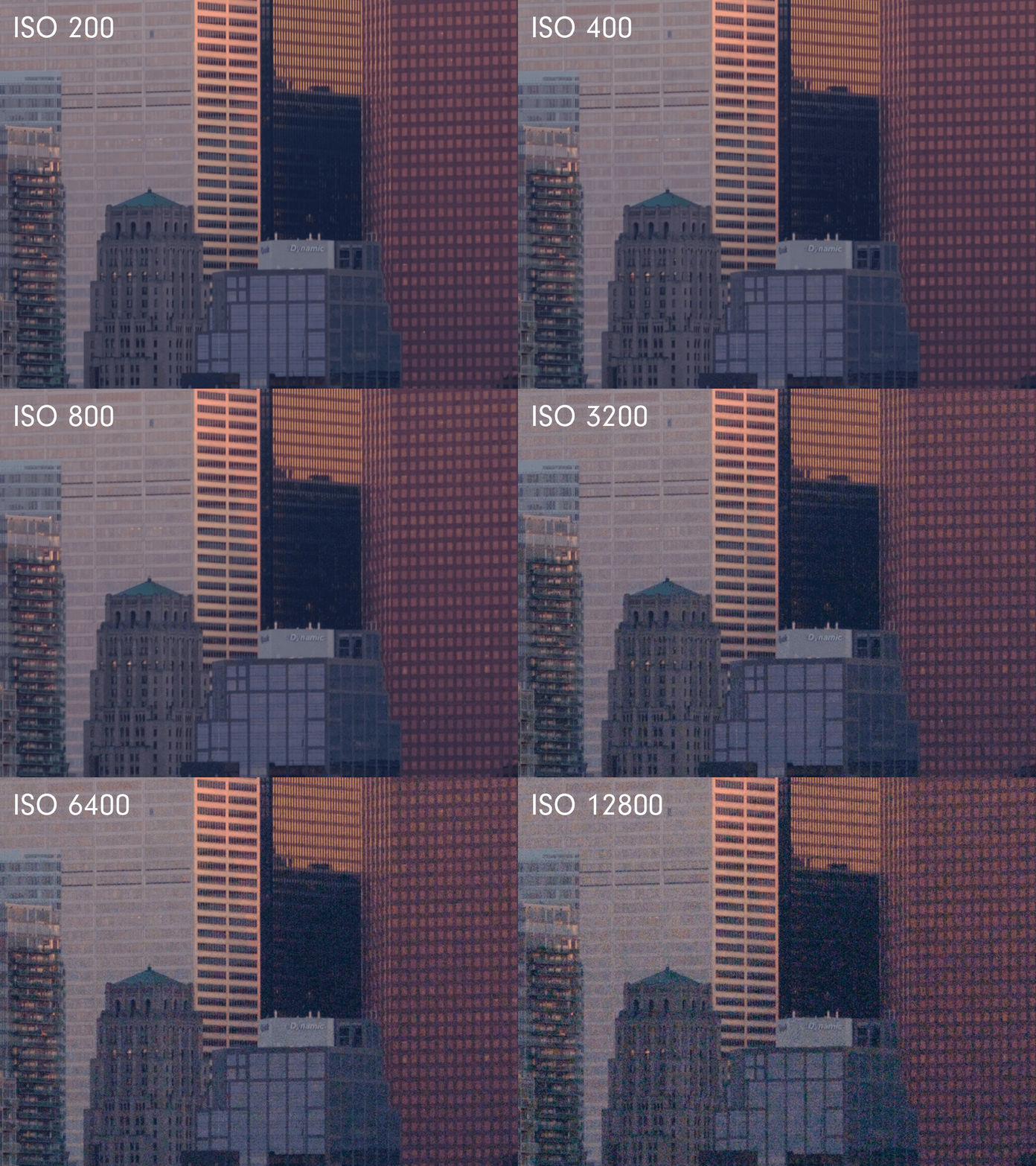
Quick ISO decisions
| Situation | ISO approach |
|---|---|
| Bright outdoor light | Begin at ISO 100 or ISO 200 |
| Open shade or moderate indoor light | Begin around ISO 400 |
| Low light when aperture and shutter speed cannot change | Increase to ISO 800 or ISO 1600 when necessary |
| Technical comparison | Keep ISO unchanged unless ISO is the setting being tested |
| Important shadow detail | Avoid severe underexposure that must be heavily brightened during editing |
Use the lowest ISO that supports the required aperture, shutter speed, and exposure. Do not preserve a low ISO when it produces an unusably dark image.
</div> </details>
Metering and Exposure Bracketing
| Control | Purpose | Use |
|---|---|---|
| Metering | Measures scene brightness and estimates an exposure | Begin with Evaluative Metering and confirm the result using the image preview and histogram |
Exposure Bracketing (EB) |
Records multiple photographs at different exposure levels | Keep off unless the activity specifically requires an exposure comparison |
Bright skies, reflective surfaces, dark backgrounds, large shadows, and strong backlighting can affect the meter. Treat it as a starting estimate rather than an automatic answer.
Quick solutions for common situations
| Situation | First control to consider | Additional adjustment |
|---|---|---|
| Moving subject appears blurred unintentionally | Use a faster shutter speed | Open the aperture or increase ISO when the image becomes too dark |
| Photograph is too dark but motion must remain frozen | Keep the fast shutter speed | Open the aperture, then increase ISO when necessary |
| Photograph is too bright in strong daylight | Use a faster shutter speed or narrower aperture | Reduce ISO to 100 |
| Background is too sharp | Open the aperture | Move closer to the subject or increase subject-to-background distance |
| Too little of the scene is sharp | Close the aperture | Use a wider focal length or move farther from the focus point |
| Handheld image shows camera shake | Use a faster shutter speed | Turn Image Stabilization on and increase ISO when necessary |
| Tripod photograph is soft | Turn Image Stabilization off | Use the self-timer and confirm focus |
| Digital noise is distracting | Reduce ISO | Add light, open the aperture, or use a slower shutter speed when possible |
| Highlights are clipped | Reduce exposure | Use a faster shutter speed, narrower aperture, or lower ISO |
| Shadows are blocked | Increase exposure when shadow detail is required | Use a slower shutter speed, wider aperture, or higher ISO |
Always protect the information required by the composition. A dark scene may correctly contain deep shadows, and a bright scene may correctly contain strong highlights.
Credits: Jessica A. Rodríguez