MediaArtTutorials
W8 - Presence, Space & Spatialization
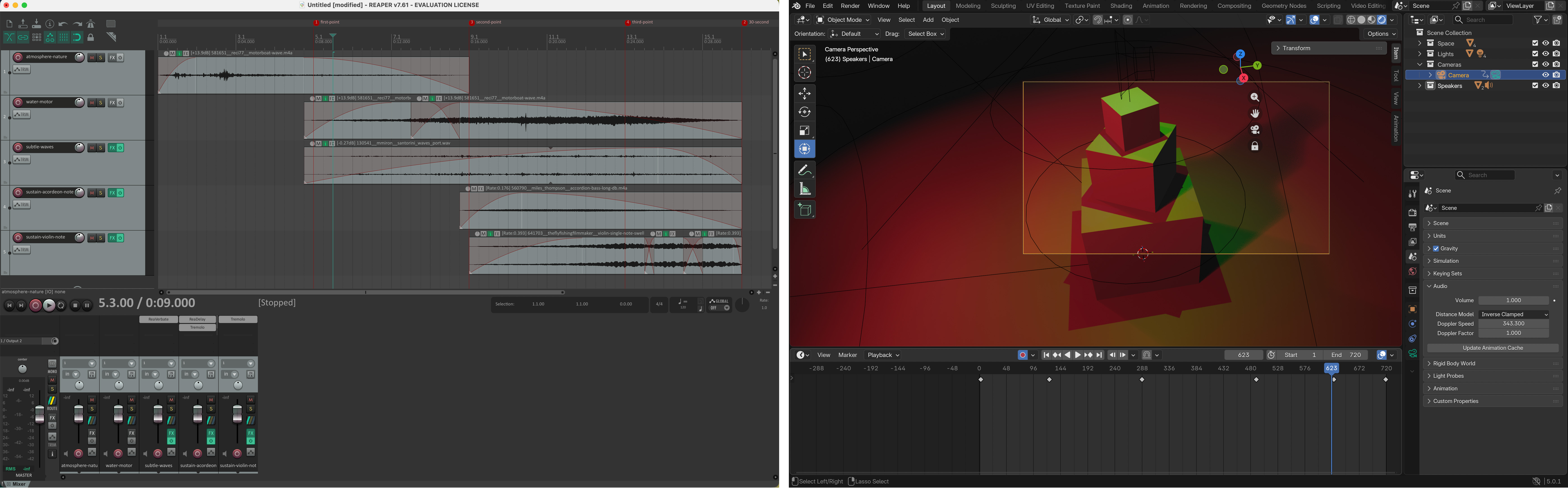
Objective
You will return to your W6 scene and create a new spatial sound composition that explores stereo presence and listener position.
This activity focuses on how sound location and audience perspective reshape perception without relying on camera movement.
Materials Required
- Computer (laptop or desktop) + Computer mouse (recommended)
- Headphones (highly recommended for accurate stereo perception and subtle spatial differences)
- Free acount on Freesound
- Reaper (free software)
👉 Download: https://www.reaper.fm/download.php - Blender (free software)
- Your Week 6 Blender file (.blend)
- Paper + pen (preferred) or digital drawing tool
Activities
Complete the following in order. Ask your professor or TA for help as needed.
[15 min] Sonic Intentions — Start Here
Use W8 vocabulary
Return to your Week 6 lighting scene and define a new sonic approach that explores stereo movement, depth, and listener perspective.
Write 4–5 sentences that respond to the following:
-
How will sound extend your Week 6 lighting transformation?
Will lighting shifts correspond to changes in panning, intensity, texture, or spatial emphasis?
What is the overall feeling you want to create? -
How will you use the stereo field to shape space?
Will sounds move gradually from left to right?
Will certain elements remain centered while others shift?
Will volume and reverb create a sense of proximity or distance?
[20 min] Gather & Curate Sound Samples
You may reuse unused sound samples from Week 7 or gather new royalty-free sounds from Freesound.
If you download new sounds, you must record the credit information (title, creator, source link, license).
Curate a focused selection of sounds that support stereo spatialization, such as:
- Textures that can move between speakers
- Sounds that can exist exclusively in one speaker
- Layers that can vary in volume to create depth
- ⚠️ No lyrics.
[60-80m] Compose in REAPER (Stereo Spatialization Focus)
Follow the REAPER tutorials below and build a 30-second stereo sound composition that explores spatial presence.
Your composition must:
- Be exactly 30 seconds long
- Combine at least 6 different sound samples
- Include a clear beginning, middle, and end
- Use a fade-in at the start and a fade-out at the end
- Maintain clean levels (no clipping; final peak at -0.3 dB)
In addition, you must:
- Use panning to shift sounds across the stereo field (Left ↔ Right),
or position certain sounds entirely in one speaker. - Use volume/gain adjustments to create depth (foreground vs background).
- Apply at least one audio effect (e.g., reverb, EQ, delay) intentionally.
- Normalize or balance levels so no track unintentionally dominates the mix.
- Ensure spatial movement feels deliberate, not random.
When finished:
- Export your final composition as a WAV file
📄 Filename:Lastname-Firstname-W8.wav - Save your REAPER project file
📄 Filename:Lastname-Firstname-W8.rpp
Tutorials
❗ Review this week’s slides for practical tips on working with multiple tracks, zoom in/out in the arrange view, track overview options, add sound effects, and automatate/animate volume, panning and sound effects.
Check W7 REAPER tutorilas
Why and How to use Reverb in REAPER
The Automation or Envelope Knob in REAPER: Animate Volume and Panning
Dynamic Special FX in REAPER - Part 1
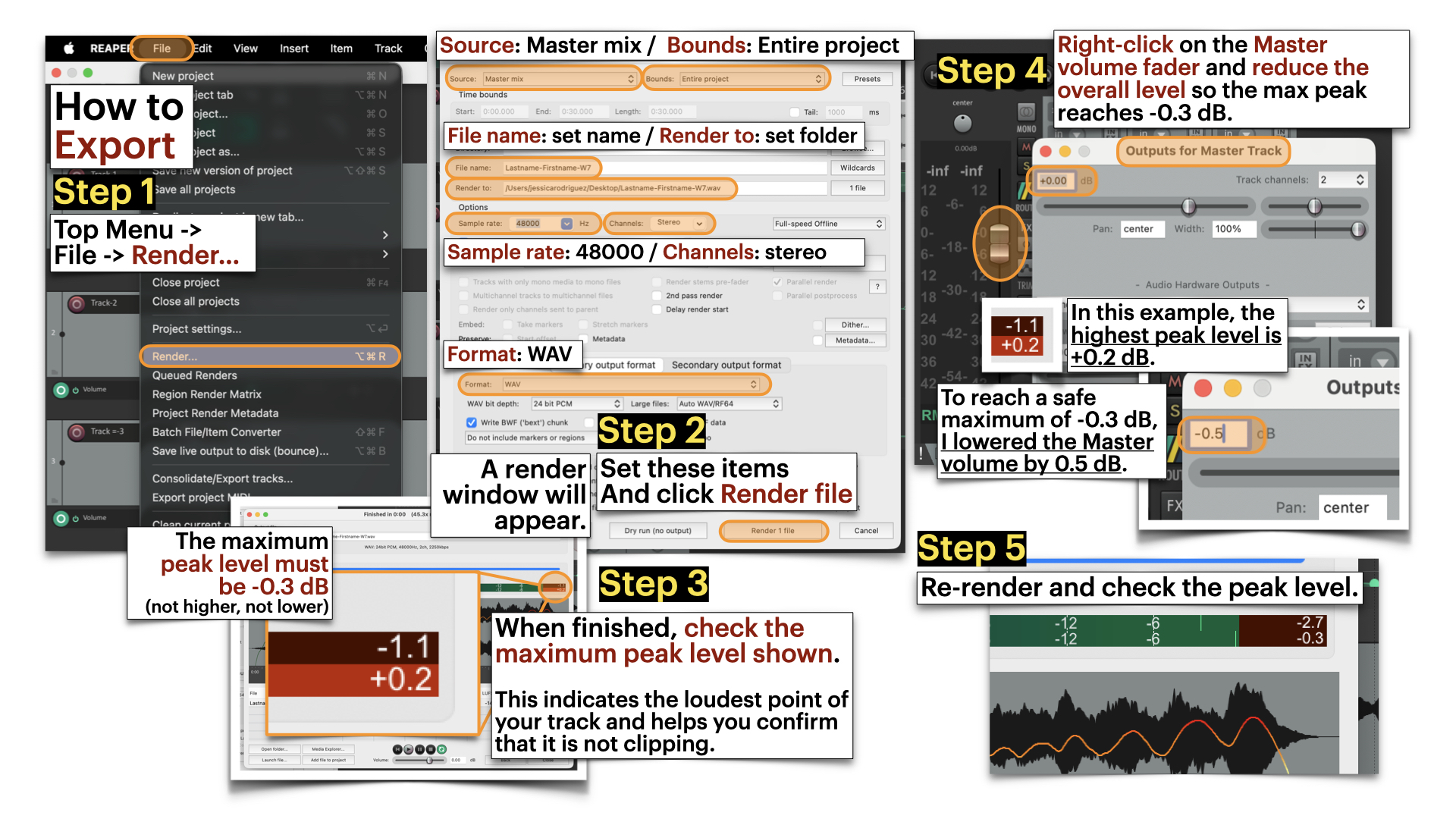
Export in Reaper and avoid master clipping
Render Settings:
- Source: Master mmix
- Bounds: Entire proejct
- File name: [Set name]
- Reder to: [Select Folder]
- Sample rate: 48000
- Channels: stereo
- Format: WAV
Dry Run = Analyzes the project locally to check peak levels without creating a file.
Render = Exports the full audio file and saves it to your selected folder.
[30-40 min] Blender: Spatial Sound Integration
First:
- Open your duplicated W6 scene.
- Adjust your timeline to 720 frames (30 seconds at 24 fps).
- Remove any previous camera animation from Week 6.
Then:
- Follow the Blender tutorials below to add a Speaker object, position it at the center of the stage, and import your sound file into the scene.
Note: The Speaker object converts your stereo file into a single spatial source. You will no longer hear left/right panning as designed in REAPER.
For this week, keep it this way. Instead of stereo separation, you will explore spatial difference through camera movement in Blender — allowing listener position to shape volume, proximity, and perceived depth. - Adjust the timing of the lighting animation to align with your 30-second sound composition.
- Animate the camera so it moves closer to and farther from the centre where the speaker object is located, allowing changes in perceived volume and spatial nuance.
The camera movement should be smooth and intentional (no random motion). Your goal is to demonstrate how camera distance and movement affect the perception of stereo panning, depth, and spatial presence.
- Follow the tutorials below to export video with sound.
Save your updated Blender file as: Lastname-Firstname-W8.blend
➡️ Export Video as MP4, codec H.264
📄 Filename: Lastname-Firstname-W8.mp4
⚠️ Videos must be final renders, not viewport screen recordings.
Tutorials
❗ Review this week’s slides for practical tips on info.
How to Use Speakers | Basic.
Using the Speaker for 3D Sound | Advance
For this week, focus only on adding speaker object, mute and volume, distance, and cone.
- 0:00 — Intro
- 0:15 — Speaker Basics
- 2:03 — Mute, Volume and Pitch
- 4:27 — The Distance Options
- 8:26 — The Cone Options
- 10:26 — Scene Properties and Doppler Effect (skip)
- 12:52 — Determining Audio Length and Start Time (skip)
- 14:30 — Exporting The Audio
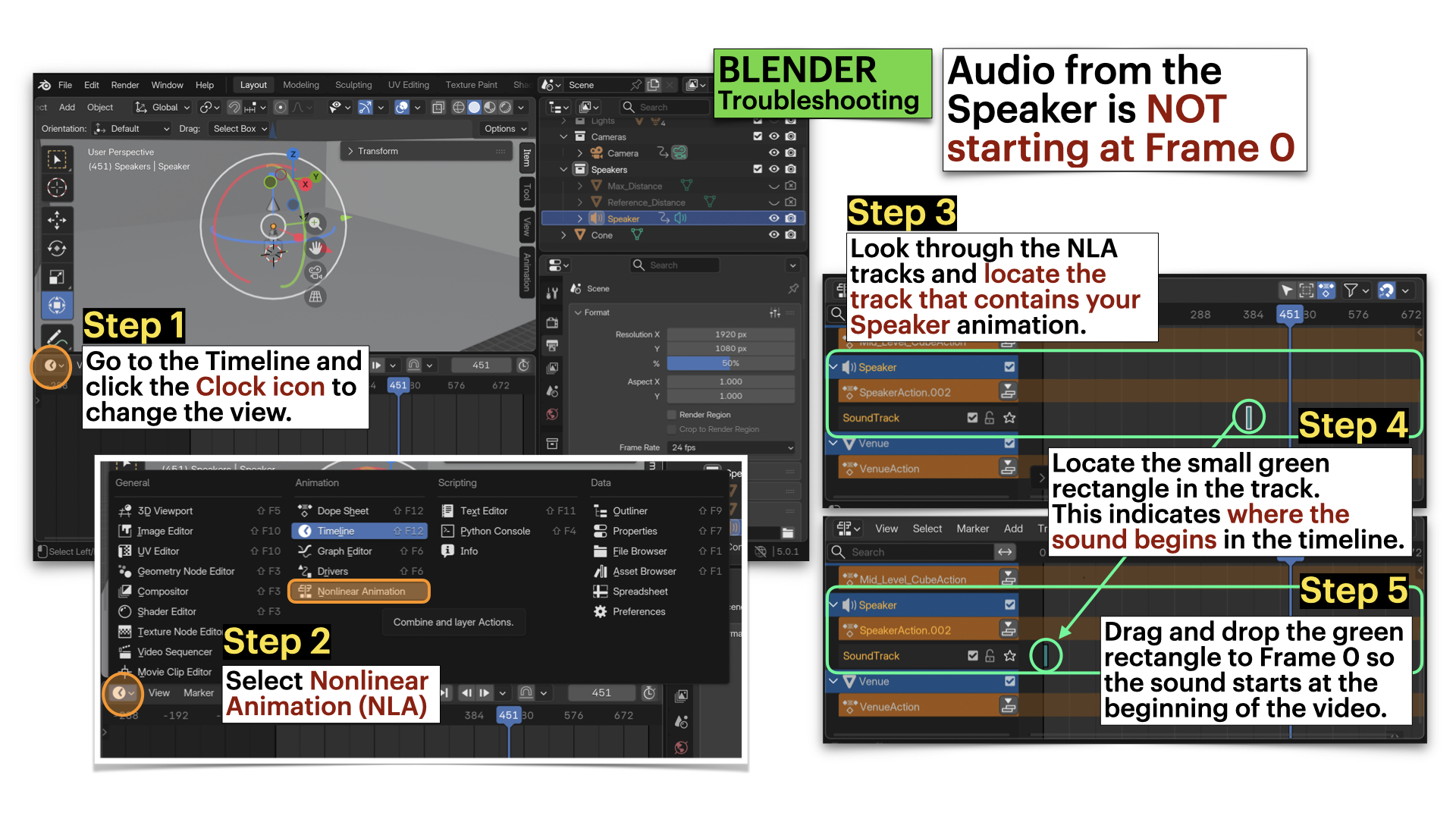
Blender: Troubleshooting - Audio From Speaker NOT Starting at Frame 0
Blender: Export File with Audio
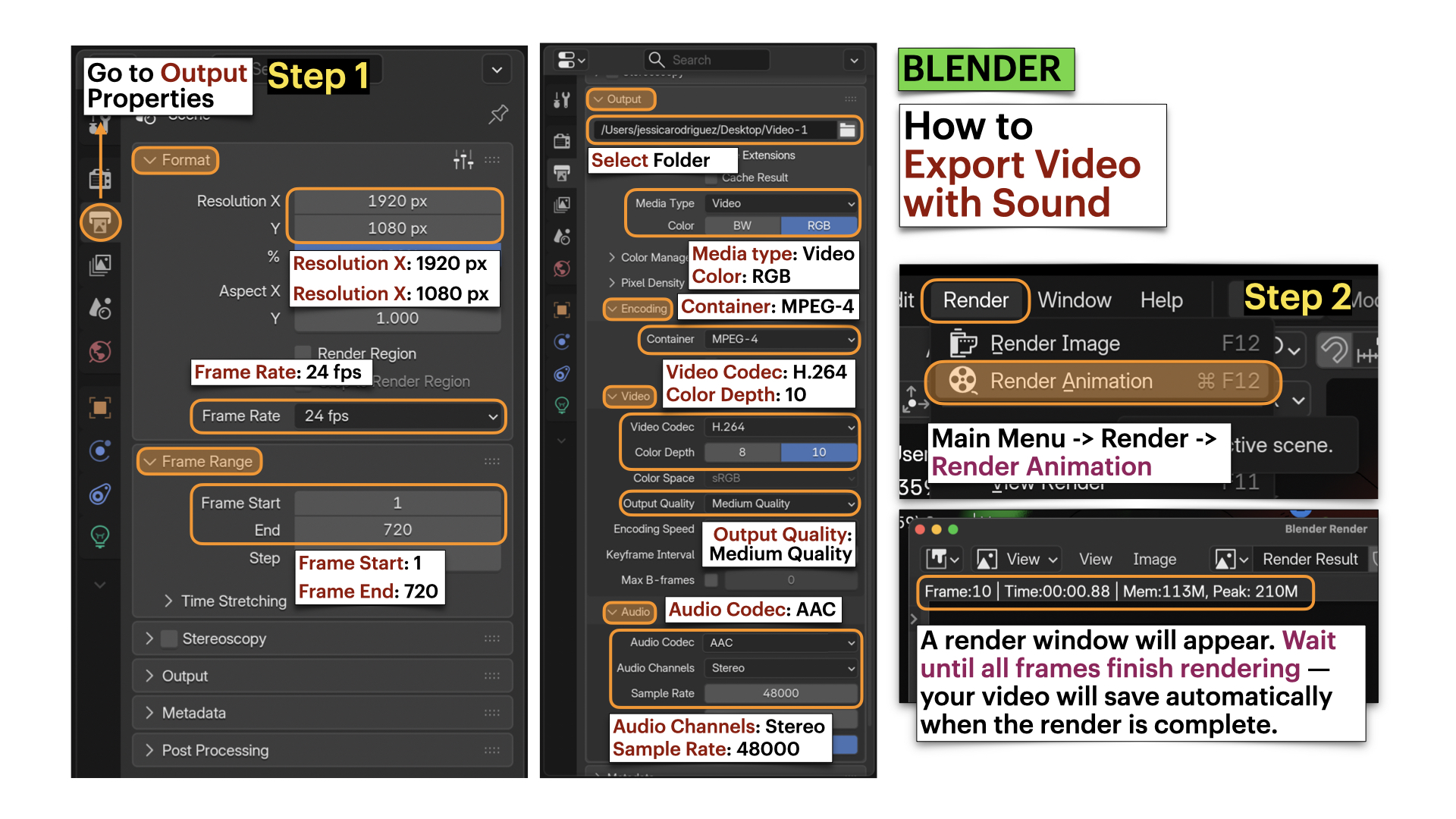
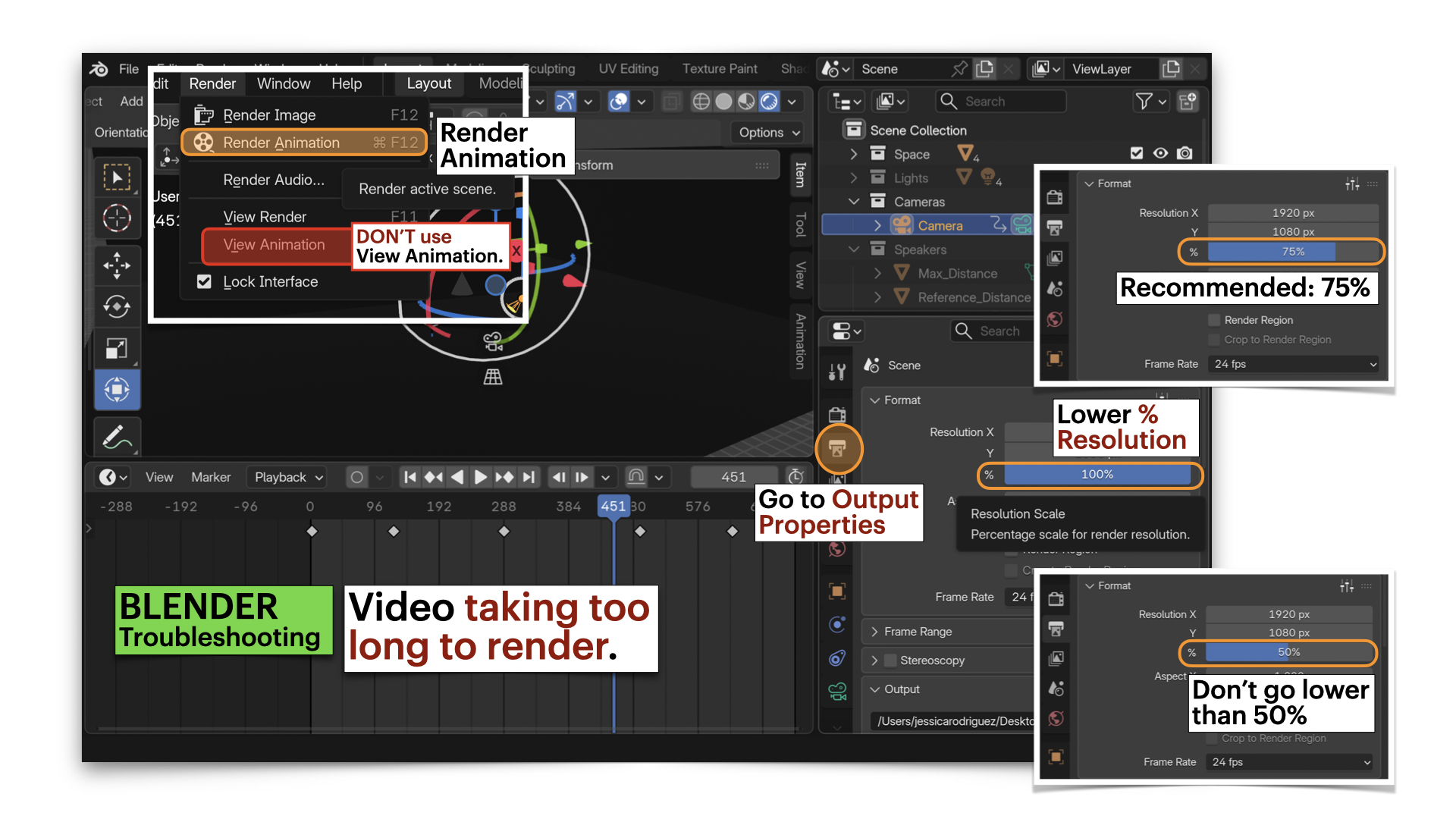
Blender: Troubleshooting - Video Taking TOO LONG to Render
Video Submission Example
Submission Documents
Create a single PDF that includes:
-
4–5 sentence sonic intention description
Briefly describe the emotional arc (beginning → middle → end) and the types of sounds you selected. -
List of sound samples used
Include for each sample:- Title
- Creator
- Source link
- License information
➡️ Export as PDF
📄 Filename: Lastname-Firstname-W8.pdf
| Component | File Name |
|---|---|
| Project document (PDF) | Lastname-Firstname-W8.pdf |
| Reaper file | Lastname-Firstname-W8.rpp |
| Sound file | Lastname-Firstname-W8.wav |
| Video file | Lastname-Firstname-W8.mp4 |
⚠️ Follow submission protocols carefully. Incorrect submissions may result in lost points.
Assessment
Your work will be assessed based on:
-
Clarity of Spatial Sonic Intentions (PDF)
The written description clearly explains how stereo movement (panning), depth (volume/reverb), and camera distance shape listener experience and extend your Week 6 lighting transformation. -
Stereo Spatialization & Sound Design (WAV + RPP)
The 30-second stereo composition demonstrates intentional use of panning (Left ↔ Right), controlled volume to create depth (foreground/background), at least six layered sound sources, effective fades, and clean audio levels (final peak at -0.3 dB, no distortion). Spatial movement feels deliberate rather than random. -
Integration in Blender & Camera Embodiment (MP4)
The sound file is correctly attached to a centered Speaker object. Camera movement (closer ↔ farther) intentionally shapes perceived volume, proximity, and spatial presence, while lighting cues remain aligned with the 30-second structure. Framing is deliberate and consistent. -
Technical Execution & File Organization
All required files (.pdf,.rpp,.wav,.mp4) follow correct naming conventions, maintain a 30-second duration, and are properly rendered (not viewport recordings).
Core Technical Vocabulary for Sound
Panning
Placing sound within the stereo field (left, centre, right)
Direction
Perceived location of the sound
Proximity
How near or far a sound feels.
Reverb (Dry / Wet)
Reflected sound that creates a sense of room size and distance
Immersion
Sound surrounds the listener
Depth
Perceived spatial layering of sound
Dynamics
Changes in loudness over time
Attack
How quickly a sound begins (e.g., sharp, slow)
Sustain
How long a sound holds
Texture
How dense or sparse the sonic field feels (e.g., minimal, layered, overlapping, isolated)
Credits: Jessica A. Rodríguez
AI Disclosure:
AI Disclosure: ChatGPT was used for editing and clarity only. No original course content was generated using AI.