MediaArtTutorials
W7 - Sound as Temporal Structure
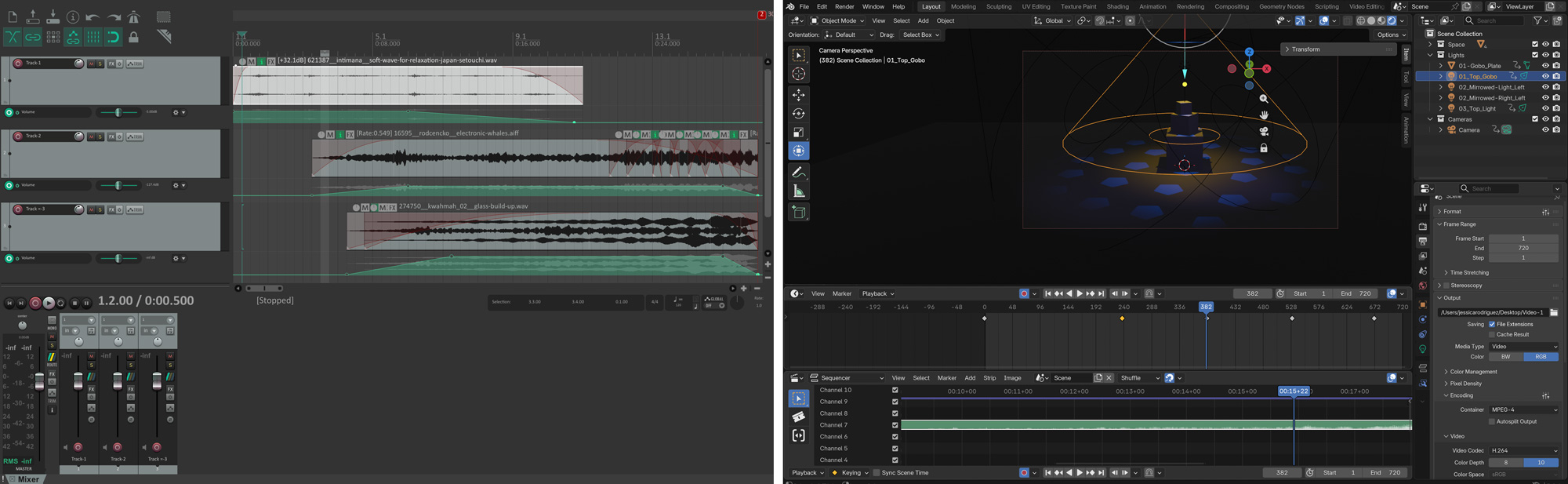
Objective
You will build on your W6 scene by creating a 30-second sound composition and integrating it into your Blender project.
This activity focuses on how layered sound, rhythm, silence, and dynamic shifts reshape attention and emotional trajectory within a fixed visual frame, without changing the stage layout or lighting design.
Materials Required
- Computer (laptop or desktop) + Computer mouse (recommended)
- Headphones (highly recommended for accurate sonic perception)
- Free acount on Freesound
- Reaper (free software)
👉 Download: https://www.reaper.fm/download.php - Blender (free software)
- Your Week 6 Blender file (.blend)
- Paper + pen (preferred) or digital drawing tool
Activities
Complete the following in order. Ask your professor or TA for help as needed.
[10 min] Sonic Intentions — Start Here
Use W7 vocabulary
Define the emotional and sonic direction of your 30-second composition in direct relation to your Week 6 lighting approach. Write 4–5 lines that answer the following:
-
How does your sound build on your Week 6 lighting transformation?
Does it reinforce the lighting shifts, contrast them, intensify them, or slow them down? -
What is the emotional arc?
What feeling defines the beginning, what shifts in the middle, and how does it end? -
What types of sounds will you use?
Will they be environmental (wind, room tone, footsteps), instrumental (strings, percussion, drone), mechanical, vocal textures, or abstract digital tones?
[20 min] Gather & Curate Sound Samples
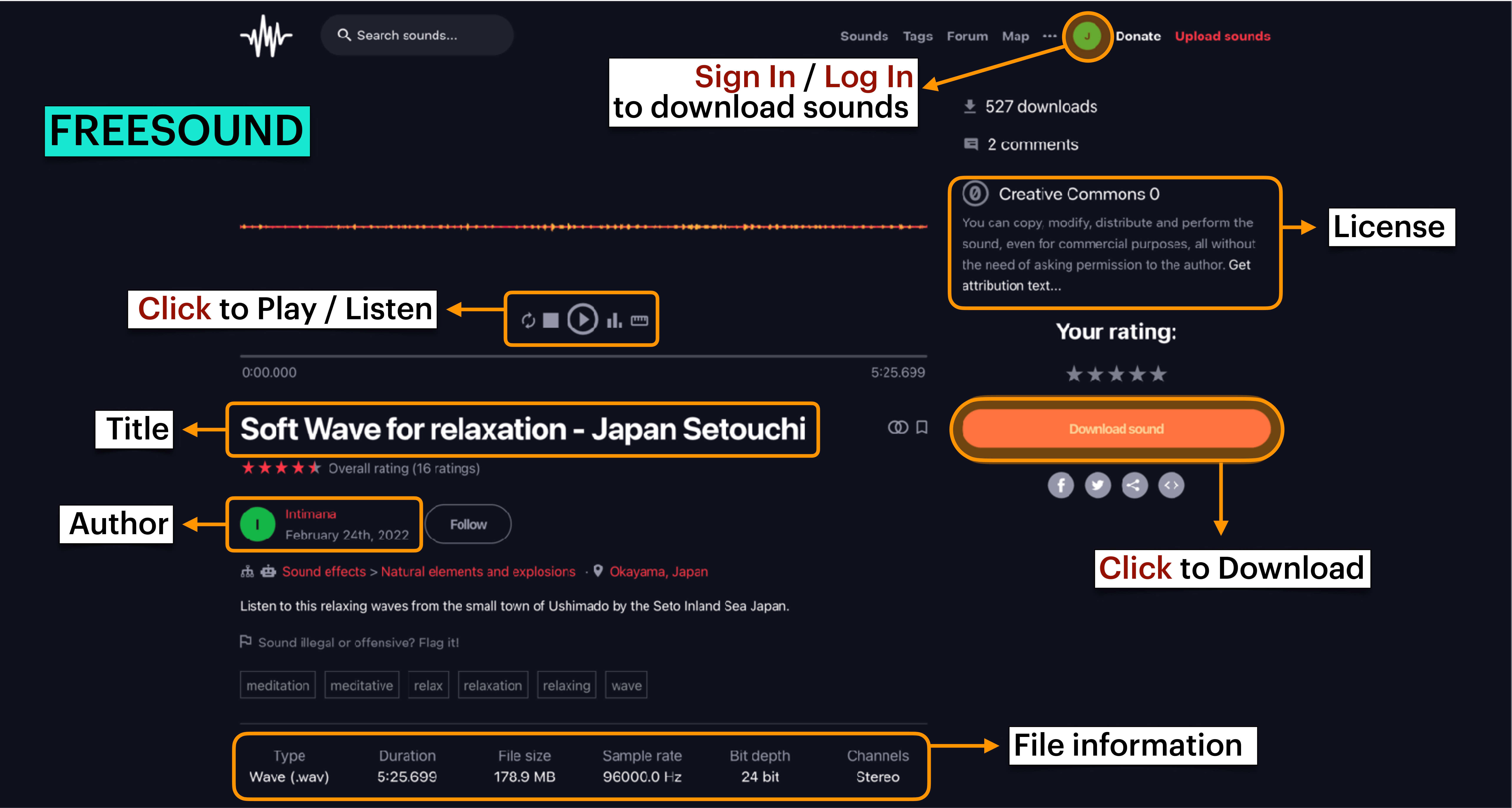
Using only royalty-free / free-use sound sources from Freesound, gather 10–15 sound samples that align with your sonic intentions. You may not use all of them, but you should curate a small palette to work from.
Look for a mix of:
- Instrumental textures (drone, strings, percussion, tonal layers)
- Environmental sounds (room tone, wind, mechanical hum, footsteps, ambience)
- Abstract or digital sounds (glitch, filtered noise, processed tones)
⚠️ No lyrics. Vocal textures are allowed, but no spoken word or songs with lyrics.
Save all files in an organized folder and record the credit information for each sound (title, creator, source link, license). You will need this for proper attribution.
[60-120m] Compose in REAPER (Basic Sound Composition Focus)
👉 Download: REAPER
Follow the REAPER tutorials below and build a 30-second sound composition.
- Be exactly 30 seconds long
- Combine at least 3 different sound samples
- Use only one or two tracks with a simple, intentional structure that includes a clear beginning, middle, and end
- Adjust the volume of individual sound samples to maintain balance and consistency
- Use crossfades between sound samples to ensure smooth transitions
- Add a fade-in at the start and a fade-out at the end
- Remove any clicks or pops that downloaded samples may contain
Clicks and pops are unwanted, sharp, transient audio artifacts that may sound like digital clicks or low-frequency thumps.
- Maintain clean audio levels (no clipping)
Clipping is distortion that occurs when audio exceeds the system’s maximum level.
When finished:
- Export your final composition as a WAV file
📄 Filename:Lastname-Firstname-W7.wav - Save your REAPER project file
📄 Filename:Lastname-Firstname-W7.rpp
Tutorials
❗ Review this week’s slides for practical tips on Blender’s interface, create new tracks and import samples, normalize files, and create marks for organization.
This is REAPER 7 - Basic Audio Editing
Change volume for a part of a track in REAPER
Removing Clicks & Pops in REAPER
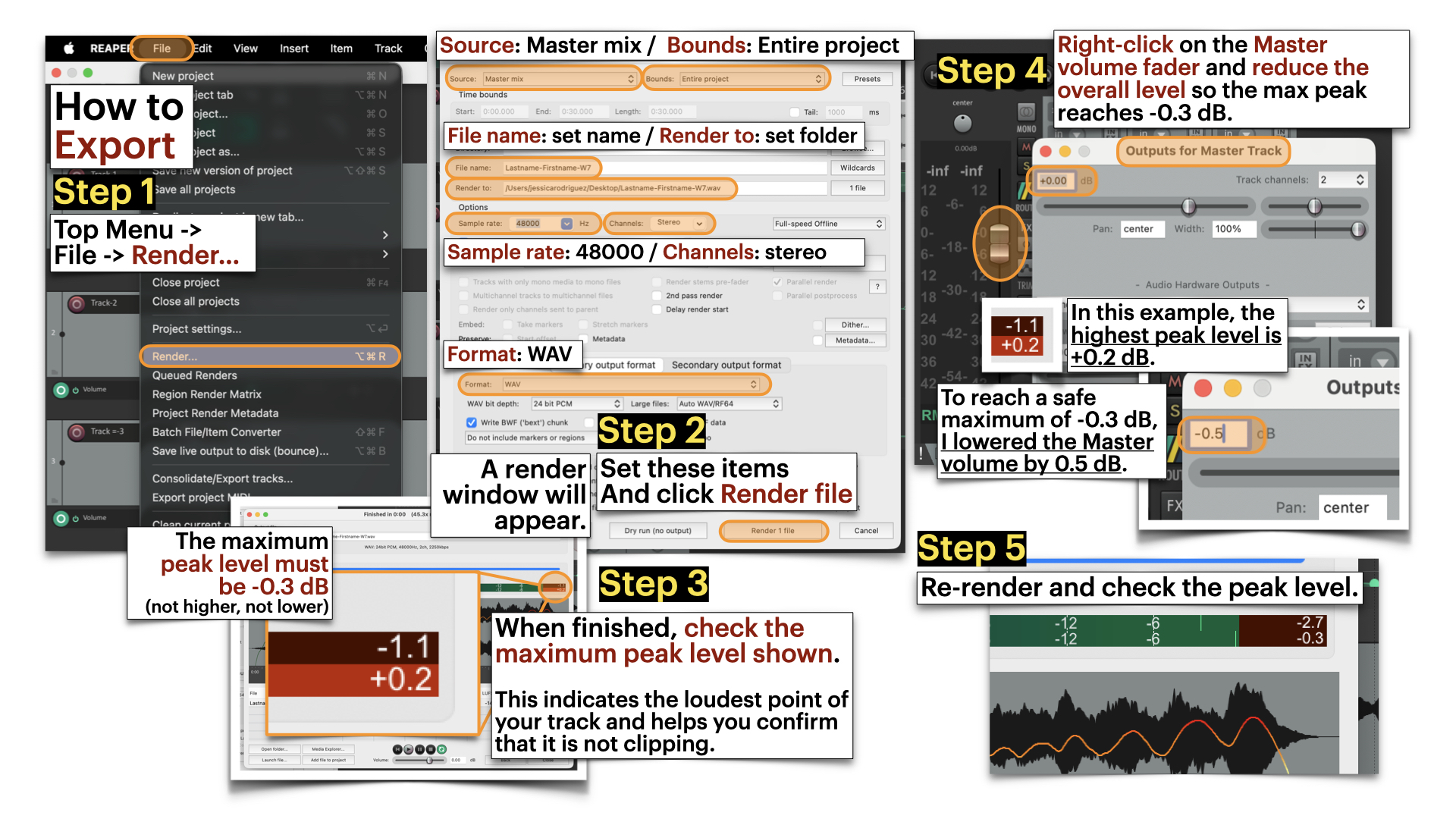
Export in Reaper and avoid master clipping
Render Settings:
- Source: Master mmix
- Bounds: Entire proejct
- File name: [Set name]
- Reder to: [Select Folder]
- Sample rate: 48000
- Channels: stereo
- Format: WAV
Dry Run = Analyzes the project locally to check peak levels without creating a file.
Render = Exports the full audio file and saves it to your selected folder.
[30 min] Blender: Sound Integration
First:
- Open your duplicated W6 scene.
- Adjust your timeline to 720 frames (30 seconds at 24 fps).
- Remove any previous camera animation from Week 6.
- Position the camera in a wide frontal shot and animate a simple, continuous forward movement or zoom (in or out) that lasts the full 30 seconds.
Then:
- Follow the Blender tutorials below to import your 30-second WAV file into your scene.
- Adjust the timing of the lighting animation to align with your 30-second sound composition.
Your goal is to demonstrate how sonic changes interact with lighting transitions to reshape perception.
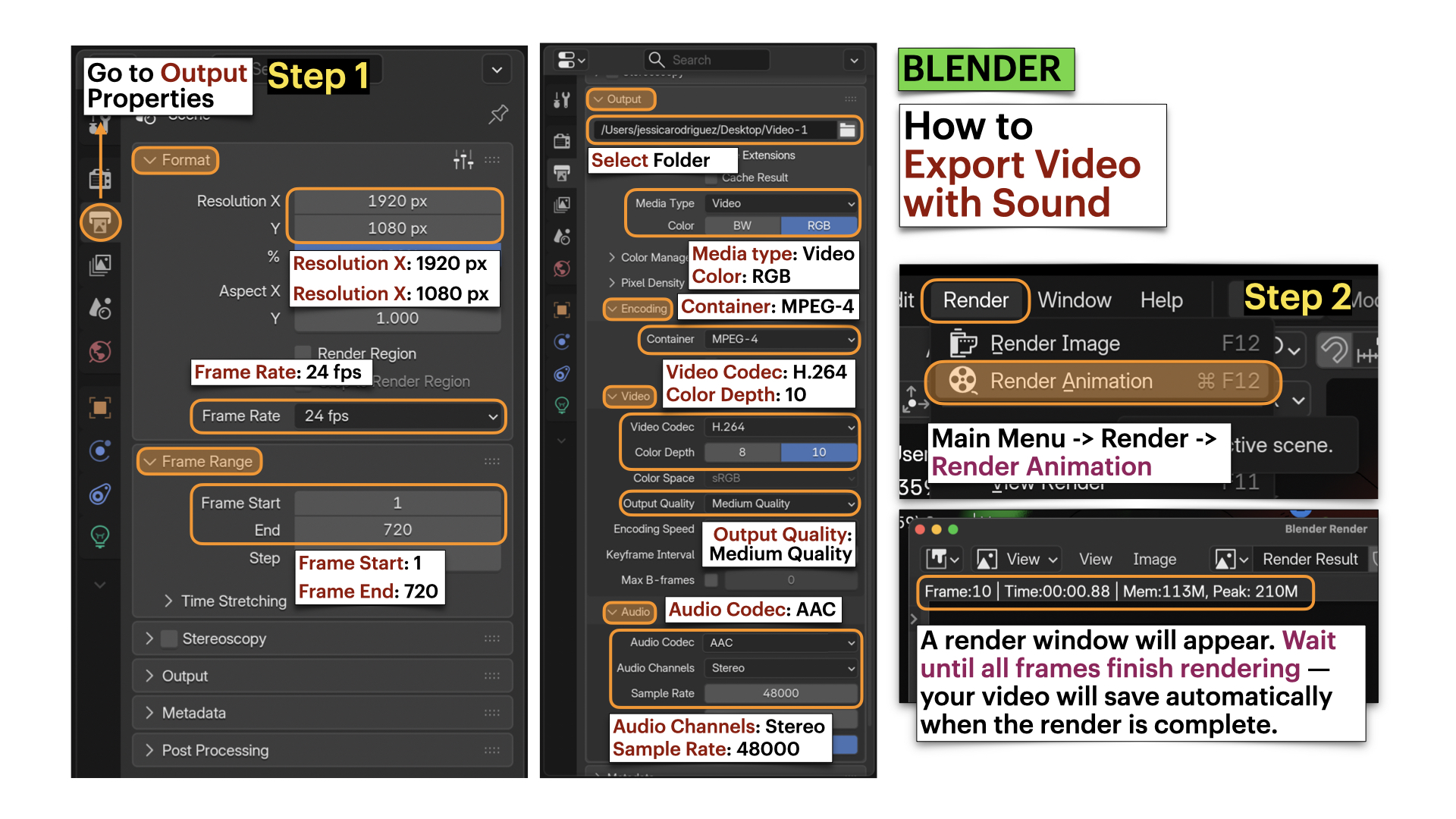
- Follow the tutorials below to export video with sound.
Save your updated Blender file as: Lastname-Firstname-W7.blend
➡️ Export Video as MP4, codec H.264
📄 Filename: Lastname-Firstname-W7.mp4
⚠️ Videos must be final renders, not viewport screen recordings.
Tutorials
❗ Review this week’s slides for practical tips for importing sound, organization, and having multiple workspaces for sound and animation editing.
How to Add Sound to your Blender Projects
Blender: Export File with Audio
Video Submission Example
Submission Documents
Create a single PDF that includes:
-
4–5 sentence sonic intention description
Briefly describe the emotional arc (beginning → middle → end) and the types of sounds you selected. -
List of sound samples used
Include for each sample:- Title
- Creator
- Source link
- License information
➡️ Export as PDF
📄 Filename: Lastname-Firstname-W7.pdf
| Component | File Name |
|---|---|
| Project document (PDF) | Lastname-Firstname-W7.pdf |
| Reaper file | Lastname-Firstname-W7.rpp |
| Sound file | Lastname-Firstname-W7.wav |
| Video file | Lastname-Firstname-W7.mp4 |
⚠️ Follow submission protocols carefully. Incorrect submissions may result in lost points.
Assessment
Your work will be assessed based on:
-
Clarity of Sonic Intentions (PDF)
The written description clearly defines the emotional arc (beginning → shift → ending), and the composition meaningfully extends your Week 6 Lighting as Temporal Transformation approach. -
Sound Composition Structure (WAV + RPP)
The 30-second composition demonstrates intentional layering of at least three sound sources, clear temporal development, effective fade-in and fade-out, and clean audio levels without distortion. -
Integration & Framing in Final Render (MP4)
Sound is properly synchronized with lighting timing across the 30-second duration.
The static wide shot demonstrates a deliberate framing strategy (rule of thirds, symmetry, or leading lines), and sound reshapes attention within a fixed frame. -
Technical Execution & File Organization
All required files (.pdf,.rpp,.wav,.mp4) follow correct naming conventions, maintain a 30-second duration, and are properly exported (not viewport recordings).
General Vocabulary
For full reference, review the slides from this week.
Music
(melody, harmony, rhythm) — e.g. music box
Atmosphere / Ambience
(room tone, environmental texture) — e.g. airport atmosphere in Colombia
Sound Effects
(events, actions, environments) — e.g. door opening effect
Voice
(speech, breath, chant, whisper) — e.g. mongolian throat singing (khoomei)
Noise
(texture, distortion, feedback, static) — e.g. rising / falling distorted frequency
Western Classical
Harmony and structure — e.g. Beethoven: Für Elise
Early 20th century
Atonality (breaking tonal expectations) — e.g. Arnold Schoenberg: Pierrot Lunaire
Mid-20th century
Musique concrète (recorded sound as composition) — e.g. Pierre Schaeffer: Études de bruits
Electronic music
Frequency-based sound construction — e.g. Stockhausen: Studie 1
Contemporary music
Hybrid, noise, resistance — e.g. björk: atopos
Core Technical Vocabulary
Frequency (Hz)
The measurable rate of vibration (High frequency vs Low frequency)
Pitch
Pitch is how we perceive frequency (High vsLow)
Tone
A sound with a clear pitch (e.g., note, drone)
Noise
A sound without a clear pitch (e.g., wind, static, crowd murmur)
Volume / Amplitude / Gain
How loud or soft a sound is (measured in dB)
Fade-In / Fade-Out
Gradual increase or decrease in volume
Credits: Jessica A. Rodríguez
AI Disclosure:
AI Disclosure: ChatGPT was used for editing and clarity only. No original course content was generated using AI.