MediaArtTutorials
Static Outdoor Scene (Groups of 3)
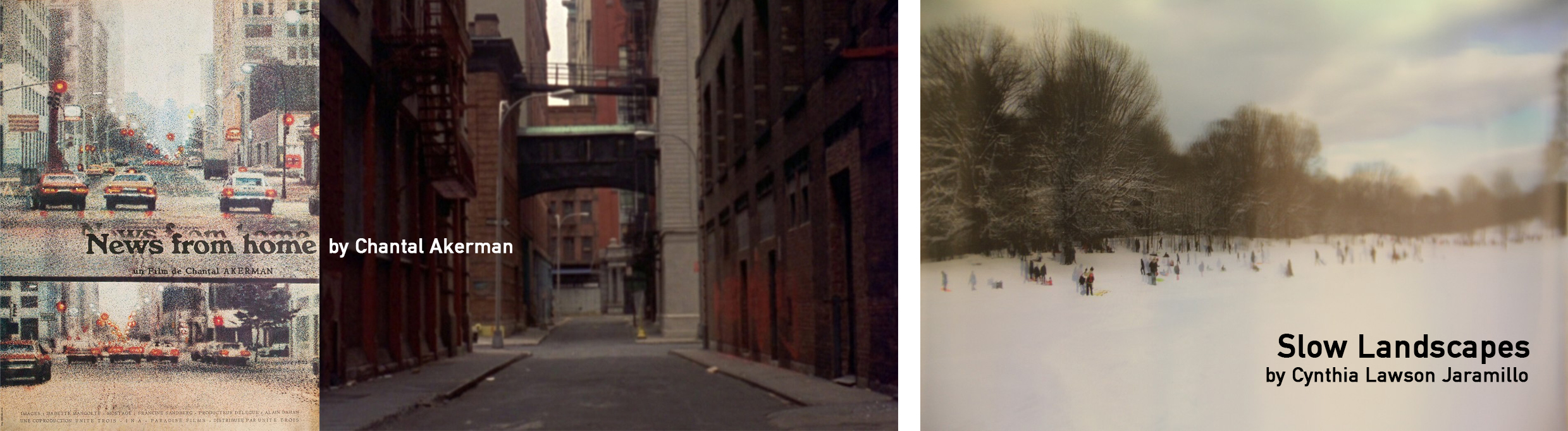
In groups of 3 students, you will create a 30-second static outdoor video that explores time, stillness, and spatial observation through a fixed camera position.
The focus of this exercise is on intentional framing, lens choice, exposure consistency, and ambient sound, not narrative action or editing complexity.
❗ Attendance and engagement are part of the rubric.
You are expected to work actively during class time and participate in all in-class activities.
Project Overview
- Format: 30-second static video
- Camera: Tripod only (no camera movement)
- Lenses: One lens per group (24mm, 35mm, or 50mm)
- Exposure: Manual Mode (M), locked for the entire shot
- Audio: Recorded separately using ZOOM H4N Handheld
- Location: McMaster University campus and immediate surroundings only
- Collaboration: Groups of 3 students
Examples
News from Home (1978), by Chantal Akerman
→ A foundational example of fixed-frame observation, where duration and stillness allow space, sound, and movement within the frame to unfold over time.
▶️ Movie Clip
▶️ Full Fim on Kanopy (McMaster Library Access)
Slow Landscapes, by Cynthia Lawson Jaramillo
→ These works emphasize subtle temporal change, environmental sound, and the quiet accumulation of detail.
🌐 Project’s Website
▶️ Sisga, Colombia Clip
Activities
Complete the following in order. Ask the professor or TAs for support or feedback.
1. Planning [15m]
Before leaving the classroom, your group must define the outdoor space you intend to record.
This is a moment to think critically about space, time, and framing before going outside.
- Do not default to the first outdoor location you think of
- Do not default to the location closest to the classroom
- Do not overthink the location
- Discuss and agree on a type of space that offers:
- depth within the frame
- visible spatial layers (foreground / midground / background)
- subtle changes over time (people passing, light shifts, wind, environmental movement)
Each group will be randomly assigned one available lens: 24mm, 35mm, or 50mm.
For more information about these lenses, see: Available Cameras & Lenses
Use this planning time to:
- imagine where the camera would be placed
- consider how the assigned lens will shape the space
The camera will remain still — all visual change must come from within the frame, not from camera movement.
You may approach duration in one of the following ways:
- Record exactly 30 seconds (not recommended)
- Record more time (up to 1 minute) and trim the beginning/end or slightly speed up the footage to reach 30s
- Record less time (minimum 15 seconds) and slow the footage to reach 30s
You won’t cut or trim within the shot. Time must remain continuous.
2. Recording [40m]
Camera Setup
Follow W3 — Tech Walkthrough
- Camera on tripod
- Manual Mode (M)
- Aspect Ratio: 16:9
- Resolution: 1920 × 1080
- Frame Rate: 30 fps
- Manual Focus (MF)
Carefully confirm focus before recording. Do not refocus mid-shot.
- Custom White Balance
- Exposure set before recording and locked
Set aperture, shutter speed, ISO, and exposure compensation before recording.
Do not change any exposure settings during the shot. - Save the following camera parameters for your submission (write them down):
Aperture, Shutter Speed, ISO - Use the histogram to confirm exposure before recording
Audio Setup
- Record audio separately using a ZOOM H4N Handheld
- One person in the group must be responsible for audio recording
- Use a hand clap at the beginning for syncing
- The Zoom may be held steadily, placed on the ground, or moved carefully to capture environmental sound
- Do not tap the recorder during recording
Recording Rules
- Record two full takes
- Each take must be continuous
- No camera movement
- No zoom in/out
- No walking in front of the camera —People may pass naturally through the frame
3. Post-Production: Premiere Pro [Begin in Class]
Refer to W3 Tutorials or previous tutorials.
Editing Requirements
- Resolution: 1280 × 720 (HD)
- Final duration: 30 seconds
- No cuts within the shot. It must be a continuous shot
- Simple fade-in (beginning) and fade-out (end) only
- Audio must come from the Zoom recording
You may adjust audio levels
- Perform colour correction
- Restore contrast
- Reduce winter flatness
- Very subtle colour grading is allowed
- Maintain a natural look
- Apply a very slow, subtle zoom-in using keyframes
- This must be minimal and gradual
- The zoom should not break image quality or framing
- Check the keyframes tutorial before applying this effect
🚫 No visual effects
🚫 No music
Submission
- ➡️ Export as PDF
- 📄 Filename:
Group-#-StaticOutdoorScene.mp4
Titles & Credits
- Titles and credits must appear on top of the image/video
- They must be:
- readable
- spatially and aesthetically considered
- No separate title cards
Project Info PDF
Create a one/two-page document including:
- One representative still image
- Title
- Year
- Authors
- Location
- 3–4 line description explaining why this location was chosen, considering spatial depth, duration, and environmental change
- Technical information: Aperture, Shutter Speed, ISO, Lens used
- Brief note on colour correction/grading: 1–2 sentences describing what was adjusted in Premiere (e.g., contrast, exposure, temperature) and why
Submission
- ➡️ Export as PDF
- 📄 Filename:
Group-#-StaticOutdoorScene.pdf
📤 Submission (one per group - 3 students)
| Item | Required Filename |
|---|---|
| Final Static Outdoor Scene MP4 | Group-#-StaticOutdoorScene.mp4 |
| Project Description PDF | Group-#-StaticOutdoorScene.pdf |
⚠️ Follow the submission protocols carefully. Incorrect submissions may result in lost points.
Credits: Jessica A. Rodríguez
AI Disclosure:
Microsoft CoPilot and ChatGPT was used for editing and clarity only, as well as to create some to the image visualizations. AI is not used to generate original course content.