MediaArtTutorials
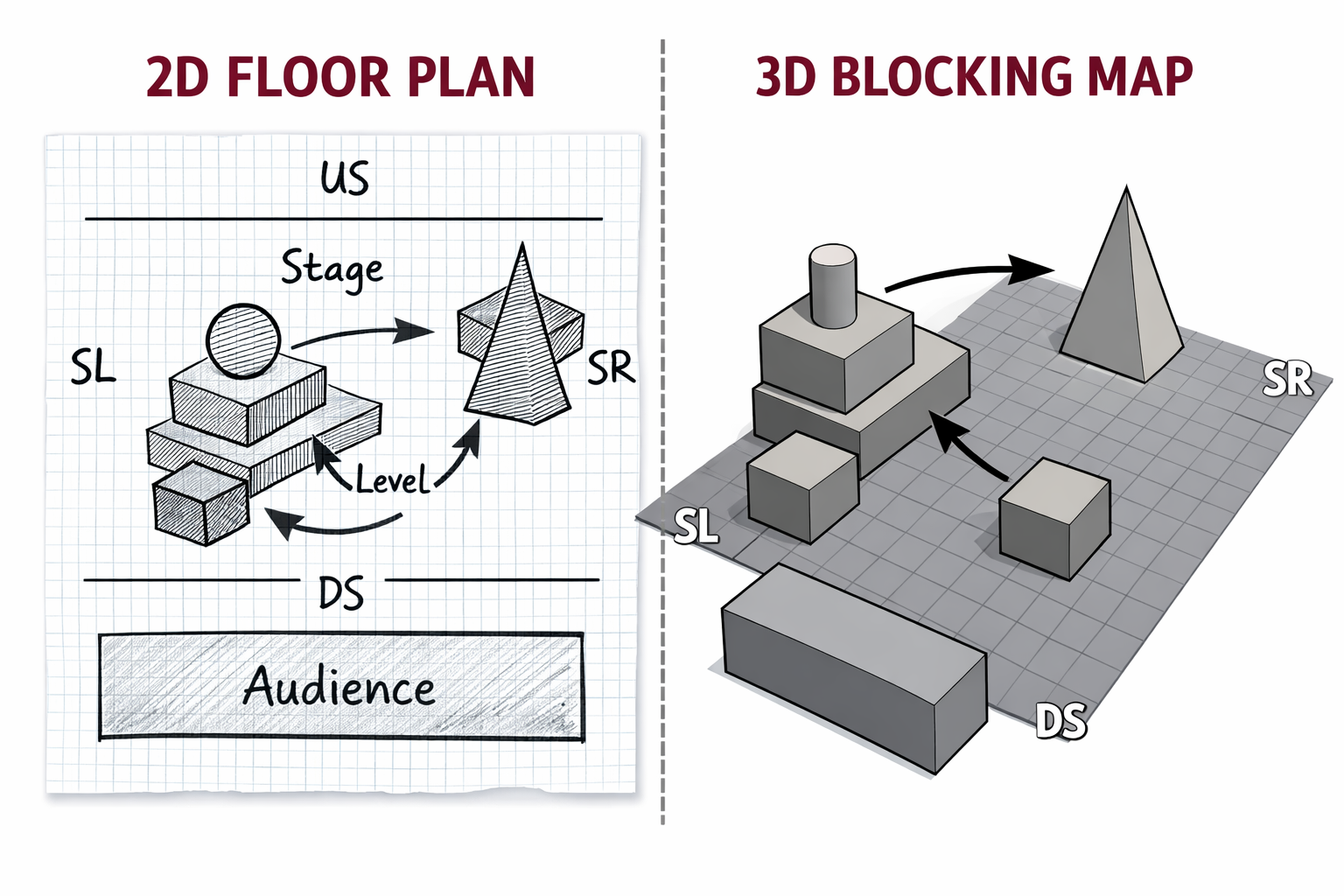
W1 — Floor Plan + Blocking Map
Objective
Introduce Blender as a tool for spatial thinking by designing a simple scene using only geometric shapes.
This activity focuses on how space communicates meaning through blocking, proxemics, levels, and orientation.
You will move from intention → 2D design → 3D space, working with strong constraints to prioritize clarity over complexity.
Materials Required
- Computer (laptop or desktop)
- Blender (free software)
👉 Download: https://www.blender.org/download/ - Computer mouse (for easy navigation in Blender)
- Paper + pen (preferred) or digital drawing tool for floor plan
Activities
Complete the following in order. Ask your professor or TA for help as needed.
[15 min] Artistic Intention — Start Here
Before drawing or opening Blender, write 3–4 sentences describing the backstory or intention of the space.
Think of this as what the space wants to communicate on its own, before any performer, light, sound, or projection appears.
Guiding Questions
- What kind of relationship or tension does this space set up through distance, separation, or containment?
- How does the space suggest power, vulnerability, or isolation using only simple forms?
- What does this space communicate before anyone enters or anything happens?
This text should guide your design decisions in the 2D floor plan and 3D scene.
➡️ Save this text for submission.
[20 min] 2D Floor Plan (Design First)
Using your artistic intention as a guide, create a 2D floor plan for your scene.
Note: Your drawing skill is not being graded. You are graded on how clearly your sketch communicates the requirements below.
Requirements
- Hand-drawn (preferred) or digital
- Placement of only geometric objects
- Minimum 5 shapes, maximum 7 shapes total
(The floor / ground plane does not count toward this limit.) - Audience position only if there is a clear stage–audience separation
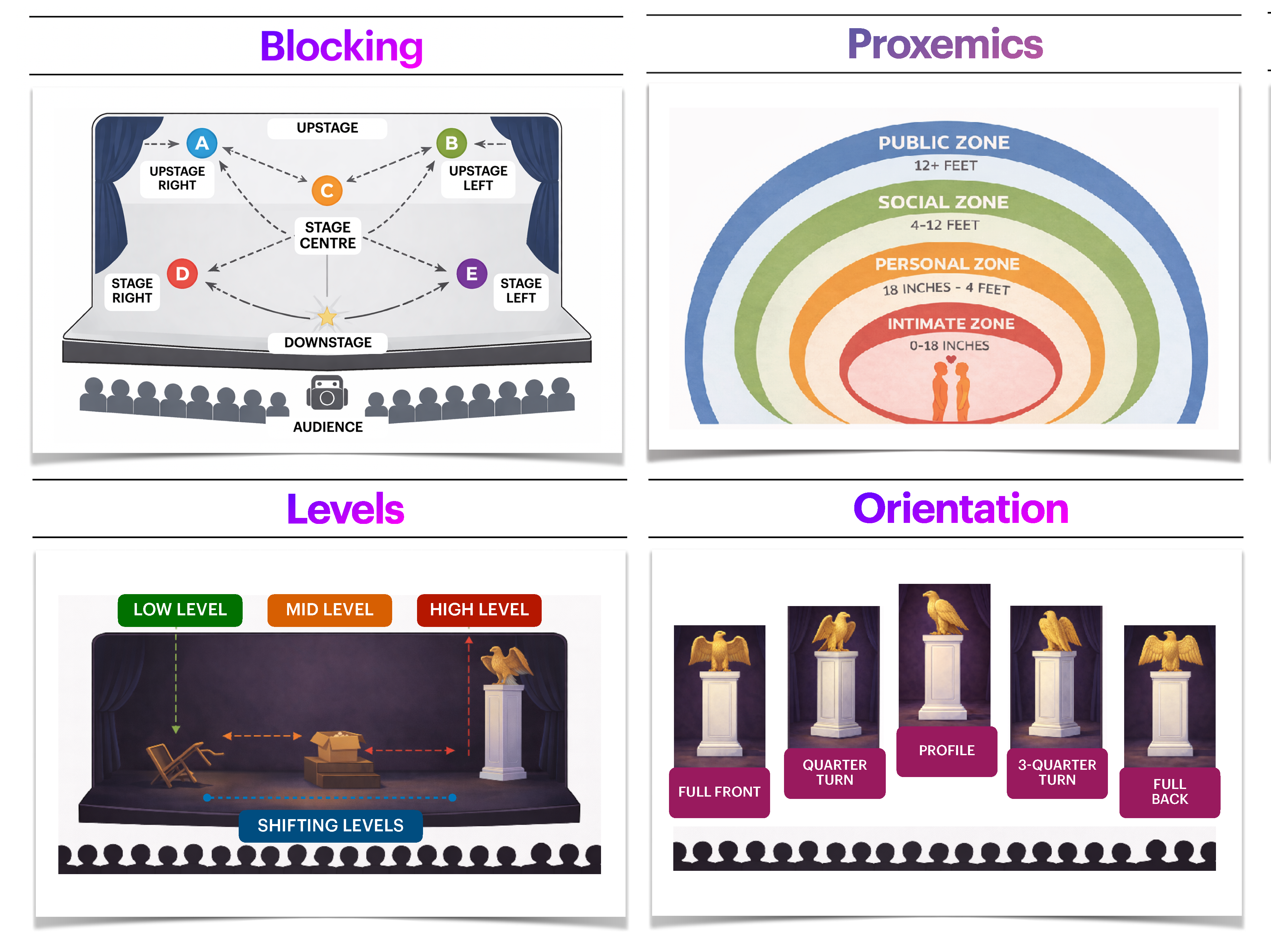
- Your scene should show intentional use of at least two of the following, clearly labelling when applicable:
- Blocking — where forms are placed
- Proxemics — distance between forms
- Levels — vertical relationships (encouraged)
- Orientation — how forms face or withhold access
⚠️ This step must be completed before building in Blender.
➡️ Save this floor pan for submission.
[10 min] Install Blender
- Download Blender:
https://www.blender.org/download/ - Install the software on your computer.
- Watch this video:
Blender may feel unfamiliar at first — this activity focuses only on basic navigation and object placement.
[60 min] 3D Scene in Blender (Geometric Only)
Learn the basics
These tools will allow you to place, duplicate, and reposition forms to test blocking, distance, and orientation in space.
Build your scene in Blender based on your 2D floor plan.
Technical Constraints (Strict)
- Use only basic geometric shapes (cube, sphere, cylinder, cone, plane, etc.).
- Minimum 5 shapes, maximum 7 shapes total
(The floor / ground plane does not count toward this limit.) - ❌ No lighting changes
- ❌ No materials or textures
- ❌ No modifiers
- ❌ No animation
- Ignore the camera (do not move or adjust it).
- Work only on Object Mode
Audience Representation
- Only required if your scene has a clear stage–audience separation.
- If included:
- Represent the audience as one collective geometric form
- A rectangular prism is recommended
- If no audience is present, this should be conceptually justified through your design.
Tutorial: Basic Object Manipulation in Blender
Check the following tutorial and focus only on the sections listed below.
You can skip any sections marked as “skip” — they are not required for this activity.
For this week, focus only on adding, moving, rotating, duplicating, and scaling basic geometric forms.
Important: Constrantly save your progress!
- 00:00 — Introduction
- 00:41 — Uses of Object Mode
- 01:04 — Getting Clearer Objects (skip)
- 02:21 — Deleting Objects
- 02:48 — Adding New Objects
- 03:10 — Duplicating Objects
- 03:31 — Grab — Moving Objects
- 03:49 — Rotating Objects
- 04:03 — Getting Exact Measurements (skip)
- 05:12 — Scaling Objects Size
- 05:24 — Using the T-Panel Tools
- 07:12 — Locking to an Axis or Direction (skip)
- 09:05 — Important Tips and Tricks (skip)
Submission Documents
Create a single document with the following sections:
- General Information
Full name, student number, and tutorial number.
- Artistic Intention
3–4 sentences describing the backstory or intention of the space.
- 2D Floor Plan
Include your labeled 2D floor plan (JPEG), clearly showing the application of at least two spatial concepts (Blocking, Proxemics, Levels, or Orientation).
- 2–3 Screenshots of the 3D Scene
Choose views/angles that best communicate the spatial relationships of your scene from different perspectives.
➡️ Export as PDF
📄 Filename: Lastname-Firstname-W1-Tutorial.pdf
Save blender file:
➡️ Save it as .blend
📄 Filename: Lastname-Firstname-3Dscene.blend
📤 Submission
| Component | File Name |
|---|---|
| Project documents | Lastname-Firstname-W1-Tutorial.pdf |
| Blender File | Lastname-Firstname-3Dscene.blend |
⚠️ Follow the submission protocols carefully. Incorrect submissions may result in lost points.
Assessment
This Week 1 activity is graded lightly based on:
- Completion and effort
- Clarity of spatial intention
- Basic technical application in Blender
This is an introductory exercise — clarity and intention matter more than polish.
Credits: Jessica A. Rodríguez
AI Disclosure:
AI Disclosure: ChatGPT was used for editing and clarity only. No original course content was generated using AI.