MediaArtTutorials
AI-Generated Graphic Novel with Microsoft Co-Pilot – Part 2
Objective
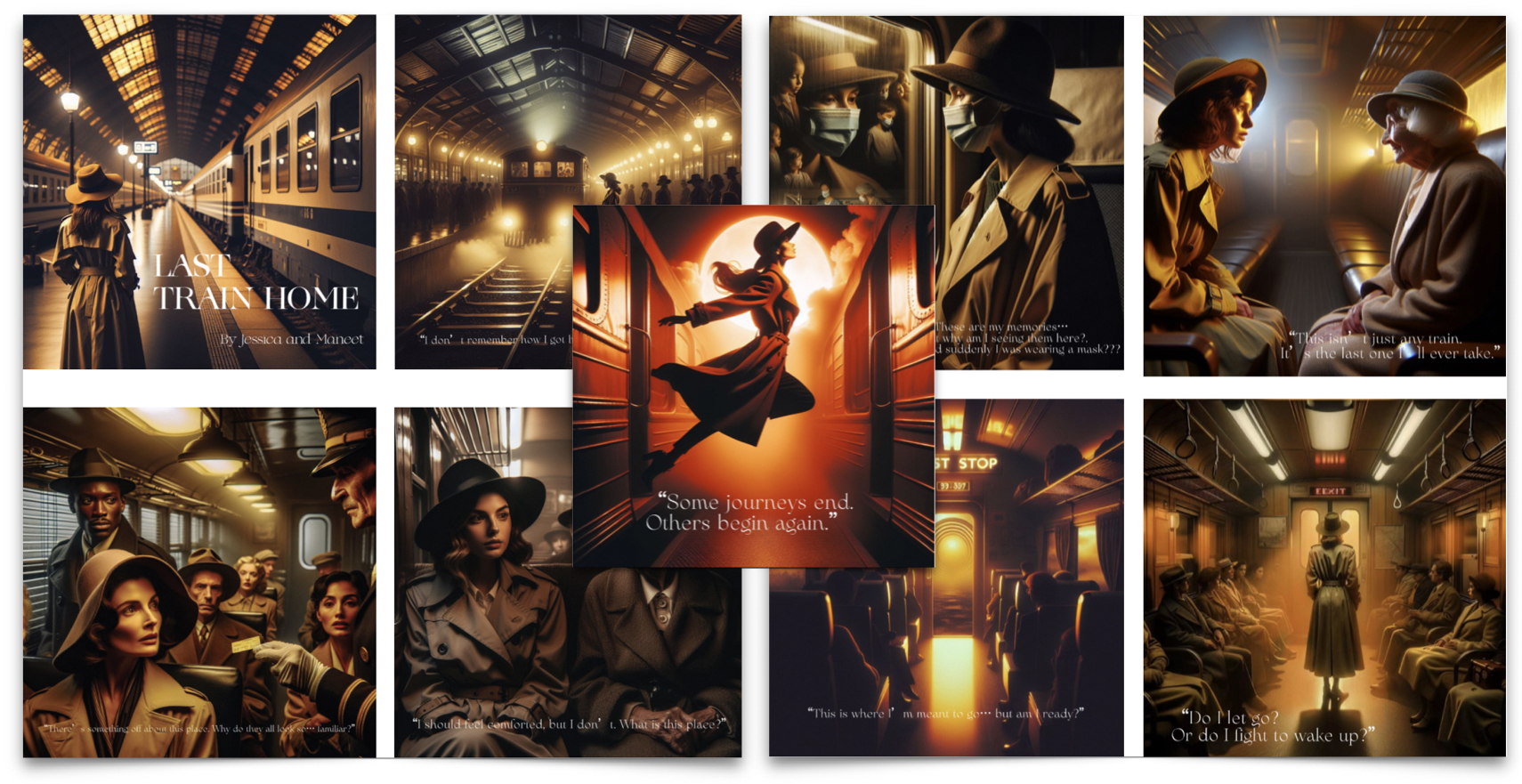
In this session, you will create a complete artistic project by applying the skills developed in Part 1.
The emphasis is on:
- Conceptual consistency
- Cohesive visual style
- Technical refinement
- Clear documentation of your creative process
- Critical reflection
Your final output consists of:
- A Graphic Novel PDF (6–10 images + story)
- A Documentation PDF (process tables, prompts, iterations, reflection)
Materials Required
- Computer with internet Access
- Microsoft Copilot](https://copilot.cloud.microsoft/){:target=”_blank”}
Log in with your McMaster account
- Online collaborative journal (Google Docs or Microsoft Word Online)
- Photo editing software (e.g., Photoshop, GIMP, Canva) for final refinements
Activities
Complete the following in order. Ask your professor or TA for support or feedback.
[10 min] Set Up an Online Collaborative Journal
Create a shared journal with the following sections:
- General Info
- Group member names
- Group number
- Tool used (Microsoft Copilot)
- Project
- Reflection
Student 1 Name: Work-in-progressStudent 2 Name: Work-in-progress
Ensure both partners have full editing access.
[20 min] Conceptualize Your Project (Group Work)
In your journal (under “Project”), answer:
- Chosen Tool
- Why did you choose Microsoft Copilot?
- What discoveries or surprises emerged in Part 1?
- What will you do differently now that you understand the tool better?
- Project Direction
- What is your story about?
- What is the theme/genre (sci-fi, documentary, surreal, fantasy, etc.)?
- What mood or emotional tone are you aiming for?
- What visual or thematic elements must remain consistent? (color palette, lighting, filters, texture, composition, aspect ratio)
- Process & Collaboration
- How will you divide the work?
Each student is expected to complete roughly half of the images.
- How will you document progress? (e.g., tables, screenshots, iterative prompts, notes)
- How will you divide the work?
[1h10m] Work on Your Project
Goal: Create a fictional story illustrated with 6–10 AI-generated images, maintaining a cohesive narrative and visual style.
Documentation Requirements
Each student must document their own process under their name. Create a four-column table for each attempted image (including failed ones):
- Story Section
- Insert the excerpt of your story that you attempted to visualize.
- Image
- Insert all generated images—even unsuccessful ones.
- Prompt
- Copy/paste the exact prompt you used.
- Comments (4–5 sentences). Reflect on:
- What worked well and why?
- What limitations or issues came up?
- If unsuccessful, how will you adjust your prompt?
- How does this iteration move you toward a cohesive visual style?
Steps for Image Creation
- Prompt Exploration & Style Refinement
- Create an initial reference image.
- Generate at least 15 iterations/image-versions experimenting with style, lighting, color palette, characters, composition
- Add screenshots of all iterations to your collaborative journal.
- Refine Prompts for Final Illustrations
- Collaboratively choose 6–8 key scenes from your story and divide these scenes.
- Write detailed prompts specifying visual style (e.g., watercolor, cyberpunk, graphic-novel inked look), character consistencies, backgrounds, and mood/tone.
- Generate multiple variations per scene to maintain cohesion.
- Document every step in your journal.
[15 min] Reflection
Under Reflection, answer:
- How did your concept evolve from initial idea to final composition?
- What were the biggest technical challenges, and how did you solve them?
- What are the artistic and ethical implications of using AI in creative work?
Once documentation is complete:
➡️ Export as PDF
📄 Filename: Group-#-Documentation.pdf
Assemble Your Project
Create your final Graphic Novel PDF. Guidelines:
- Use graphic editing software (e.g., Photoshop, Canva, InDesign)
- Combine text and visuals creatively.
- Visual layout choices are part of your grade
- You may choose:
- One image per page, or
- Comic-style layout, combining multiple images per page
- Include a Cover Page with:
- Title of your story
- A representative or introductory image
- Group member names
- Year
➡️ Export as PDF
📄 Filename: Group-#-GraphicNovel.pdf
📤 Submissions
| Type | File Name | Who Submits |
|---|---|---|
| Group | Group-#-Documentation.pdf |
One per group |
| Group | Group-#-GraphicNovel.pdf |
One per group |
⚠️ Follow the submission protocols carefully. Incorrect submissions may result in lost points.